Do Digital Hygrometers Need Calibration
You look at your hygrometer. It reads 62% humidity. But is that number real?
That's the exact question behind whether do digital hygrometers need calibration, and the answer is more complicated than a simple yes or no. It depends entirely on what you're protecting and how much error you can afford.
Manufacturer specs for most consumer-grade hygrometers list an accuracy of ±3% to ±5% relative humidity right out of the box. But as of 2026, even budget sensors can drift by another 1% to 2% over their first year of use. Per NIST guidelines, any instrument used for critical monitoring should be verified against a known reference periodically.
That's why understanding the calibration process matters before you trust a reading with your cigars, guitars, or grow room.
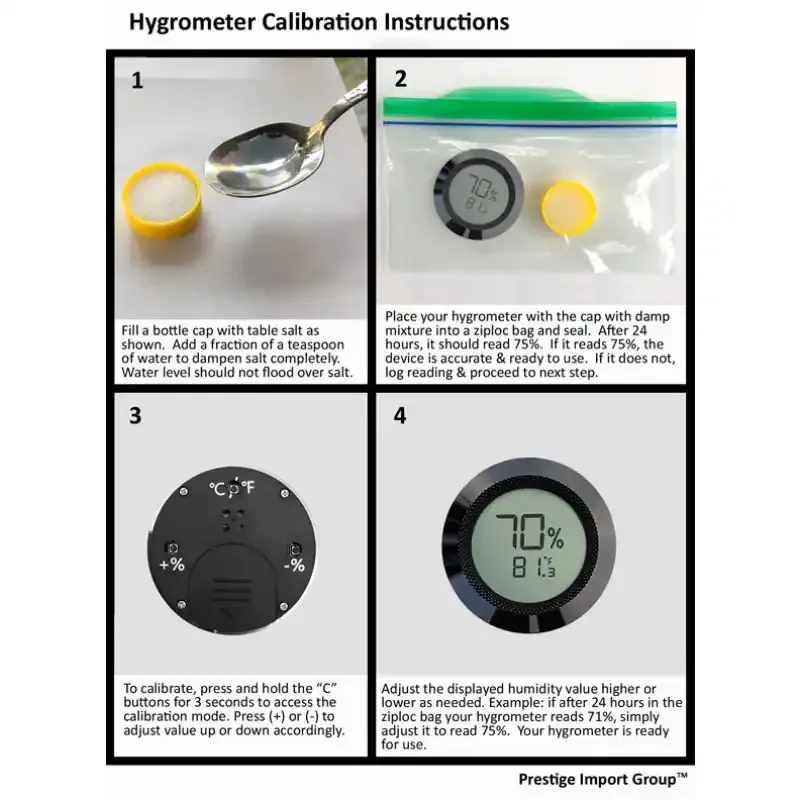
Image source: Bing (Web (fair-use with source credit))
Quick Answer
Yes, most digital hygrometers need periodic calibration. Factory tolerances of ±3% to ±5% RH are common. Sensor drift happens over time.
A simple salt test can verify accuracy. If your device allows adjustment, recalibrate annually. If it doesn't, consider replacing it when readings seem off.
The Short Answer: Most Do, But It Depends
Here's the honest truth. Not every hygrometer needs calibration, and not every user needs to worry about it. The key variable is your tolerance for error.
If you're using a hygrometer to check general indoor comfort, a reading that's off by 5% probably doesn't matter. You'll still know if the air feels dry or sticky. But if you're storing cigars, wine, wooden instruments, or reptile eggs, a 5% error can mean the difference between perfect conditions and mold, cracks, or failed hatch rates.
When you probably need to calibrate:
- You're storing something sensitive to humidity (cigars, guitars, wine, art, seeds)
- Your hygrometer costs less than $20 (these have the widest factory tolerances)
- You've owned the device for more than a year
- You recently changed the batteries (some sensors reset after power loss)
- You notice readings that don't match how the air actually feels
When you can probably skip calibration:
- You're using it for casual room monitoring only
- Your hygrometer is a high-end model with a stated accuracy of ±1.5% RH or better
- You're okay with knowing "roughly" whether it's humid or dry
The real question isn't whether your hygrometer can be calibrated. It's whether the stakes are high enough to justify the 24 hours a salt test takes. For most people with a sensitive storage setup, the answer is yes.
For everyone else, it's optional.
How Digital Hygrometers Actually Work and Why They Drift
To understand calibration, you need to know what's happening inside the little plastic box. Digital hygrometers measure humidity using a sensor that detects changes in electrical capacitance or resistance as water vapor in the air increases or decreases.
Capacitive sensors are the most common in consumer devices. They use a thin polymer film that absorbs moisture. As the film absorbs water, its capacitance changes.
The sensor translates that change into a relative humidity reading. These sensors are fast and accurate, but they degrade over time.
Resistive sensors use a salt or ceramic coating that changes electrical resistance with humidity. They're cheaper to manufacture, but they're slower to respond and tend to drift more noticeably over time.
Why drift happens:
- Exposure to high humidity or condensation damages the sensor coating
- Dust, smoke, and chemical vapors (including off-gassing from new wood or paint) coat the sensor surface
- Temperature extremes cause physical expansion and contraction that slowly degrade the sensor material
- Age. Every sensor has a lifespan. The polymer film loses sensitivity over years of use
Aggregate reviews and manufacturer documentation confirm that the first year of use is when most drift occurs. A hygrometer that reads 75% RH correctly at purchase might read 73% or 78% after twelve months. That's still within factory spec for many cheap units.
But it's enough to throw off a carefully maintained humidor or incubator.
The good news is that drift is usually linear. If your hygrometer reads 2% high at 75% RH, it's probably 2% high across the whole range. That means a single-point calibration (like the salt test at 75% RH) can correct the error for most practical purposes.
The Decision Tree: Does Your Hygrometer Need Calibration?
This is where we turn the general answer into a personal one. Follow these four steps to decide what to do with your specific device.
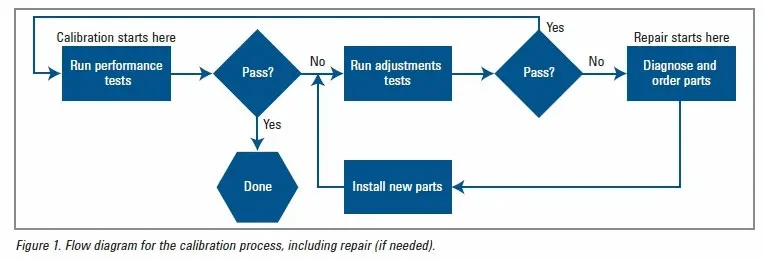
Image source: Bing (Web (fair-use with source credit))
Step 1: Check for a Manual Calibration Mode
Not every hygrometer lets you adjust the reading. Look in the user manual or search online for your model number plus "calibration mode." Common methods include pressing and holding a button for 5 seconds or using a small screwdriver to turn a dial inside the battery compartment.
If your device has a calibration mode: You can adjust the reading after testing. Move to Step 2.
If your device does not have a calibration mode: You can still verify accuracy, but you cannot correct it. If the reading is off by more than your tolerance, you'll need to replace the unit. Skip to Step 4.
Step 2: Test Your Unit's Current Accuracy
Use the salt test described in the next section. This gives you a known reference point of 75% RH. Run the test and note what your hygrometer reads after 24 hours.
If the reading is within your tolerance (e.g., 73% to 77% for a ±2% tolerance): No calibration needed. You're done for now.
If the reading is outside your tolerance: Move to Step 3.
Step 3: Decide Whether to Adjust or Replace
If your device has a calibration mode: Adjust it to read 75% RH. Done.
If your device does not have a calibration mode: You have two options. You can mentally offset the reading (if it reads 72% in the test, add 3% to all future readings). Or you can replace the hygrometer with one that supports calibration.
Step 4: Match Against Your Use Case
| Use Case | Tolerance | Action |
|---|---|---|
| General room comfort | ±5% RH | Calibration optional |
| Cigar humidor | ±2% RH | Calibrate annually |
| Guitar storage | ±3% RH | Calibrate every 6 months |
| Reptile enclosure | ±3% RH | Calibrate every 6 months |
| Greenhouse / grow tent | ±2% RH | Calibrate quarterly |
| Wine cellar | ±3% RH | Calibrate annually |
| Incubator | ±1% RH | Calibrate before each use |
How to Calibrate With the Salt Test Step by Step
The salt test is the gold standard for home calibration. It's cheap, reliable, and uses materials you probably already have. The science is simple: a saturated salt solution creates a stable humidity of exactly 75% RH in a sealed container at room temperature.
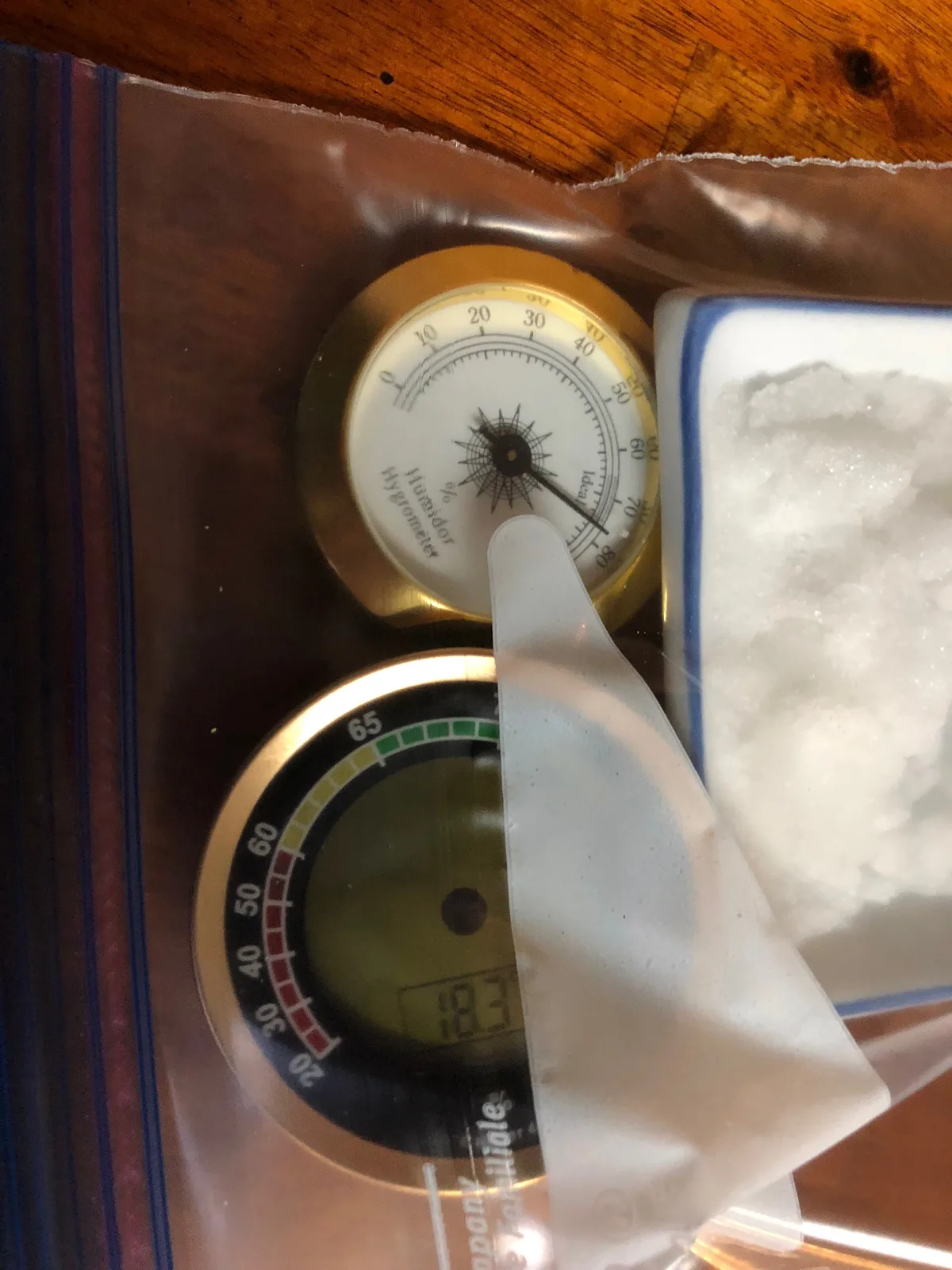
Image source: Bing (Web (fair-use with source credit))
What you'll need:
- Table salt (non-iodized works best, but iodized is fine in a pinch)
- A small container (bottle cap, jar lid, or shot glass)
- A resealable plastic bag or airtight container large enough to hold both the salt cup and your hygrometer
- A spoon
- Water
The process:
Add a tablespoon of salt to the small container. Don't pack it down. Just a loose layer.
Add water drop by drop. You want the salt to be wet but not swimming. Stir it until it looks like wet sand. If you see standing water, pour off the excess. The goal is saturated, not submerged.
Place the salt container and your hygrometer inside the plastic bag or airtight container. Make sure they're next to each other, not touching. The hygrometer needs to breathe the same air as the salt solution.
Seal the bag or container tightly. No leaks. You want the air inside to reach equilibrium with the salt solution.
Wait 24 hours. Do not open the bag. Do not peek. The salt solution needs time to stabilize the humidity at 75% RH.
Read the hygrometer without opening the bag. If you can read it through the plastic, do that. If not, open quickly, read, and note the number. The ideal reading is 75%. If it reads 72%, your hygrometer is 3% low. If it reads 78%, it's 3% high.
Adjust if possible. If your hygrometer has a calibration mode, set it to read 75% while still in the bag. If it doesn't, note the offset and mentally adjust future readings.
Pro tip: After calibration, remove the hygrometer from the bag and let it air out for 30 minutes before using it. The bag environment is extremely stable, but it's not representative of normal room conditions.
Common Calibration Mistakes and How to Avoid Them
The salt test is simple, but small errors can ruin your results. Here are the most common mistakes people make and how to avoid every one.
Using the wrong salt ratio. Too much water and you get a different humidity level. Too little salt and the solution never saturates. The fix: aim for wet sand texture, not soup.
If you see liquid pooling, you've added too much water.
Reading results too early. The salt solution needs time to stabilize. Six hours is not enough. Twelve hours is risky.
Twenty four hours is the standard. Per NIST calibration procedures, equilibrium takes time. Don't rush it.
Testing in a leaky bag. If the bag isn't sealed, outside air mixes with the salt air and your reference point drifts. Use a bag that seals completely. Double check the zipper.
If you're using a container, make sure the lid is tight.
Adjusting a sensor that doesn't support adjustment. Some cheap hygrometers have a "calibration" button that does nothing. Others have a hidden mode that's easy to confuse. Test with the salt test first.
If you can't adjust the reading, don't force it. You'll just make things worse.
Forgetting to recalibrate after battery changes. Some hygrometers lose their calibration offset when the battery is removed. If you've changed the battery and the readings seem off, run the salt test again. It's cheap insurance.
Assuming all hygrometers drift the same way. Resistive sensors drift faster than capacitive sensors. Cheap sensors drift faster than quality ones. A $10 hygrometer might drift 5% in a year.
A $40 unit might hold ±1% for years. Know what you own.
Testing in extreme temperatures. The salt test assumes room temperature, roughly 68°F to 77°F. If your basement is 55°F, the salt solution will stabilize at a slightly different RH. Run the test in a climate-controlled room for best results.
Not writing down the results. You'll forget. Write the offset on a piece of tape and stick it to the back of the hygrometer. Next year, you'll know exactly where it was and how much it drifted.
What If Your Hygrometer Can't Be Calibrated? (Fix or Replace)
You've run the salt test. Your hygrometer reads 68% instead of 75%. You look for a calibration mode.
Nothing. Now what?
This is the most common frustration with cheap hygrometers. Many models under $15 have no user-adjustable calibration. The sensor is what it is.
Your options in order of practicality:
Option 1: Mental offset. If you know your hygrometer reads 7% low, add 7% to every reading. Write the offset on the back with a sharpie. This works fine for casual use, but it's easy to forget.
Option 2: Accept the error. If the drift is small (2% to 3%) and your use case isn't critical, just live with it. You know the direction of the error. That's enough for most situations.
Option 3: Replace the unit. If the error is large (5% or more) and you can't adjust, buy a new hygrometer. Look for one that explicitly states it has a calibration mode. ThermoPro and Govee models in the $15 to $30 range typically support adjustment.
When to replace vs. when to live with it:
- Error under 3%: Live with it or use mental offset
- Error 3% to 5%: Consider replacing if you need precision
- Error over 5%: Replace. The sensor is failing.
One more thing: Some hygrometers that lack a calibration button can still be adjusted by opening the case and turning a small trim pot on the circuit board. This voids the warranty and requires a tiny screwdriver. Only attempt this if you're comfortable with electronics repair.
Calibration FAQs: Quick Answers to Common Questions
How often should I calibrate my hygrometer?
Once a year is the standard recommendation for most use cases. If you're storing something sensitive like cigars or reptile eggs, calibrate every six months. If you notice readings that seem off, calibrate immediately.
Does temperature affect calibration accuracy?
Yes. The salt test assumes a room temperature between 68°F and 77°F. Extreme temperatures shift the equilibrium point of the salt solution.
Always run the test in a climate-controlled room for the most reliable results.
Can I use a Boveda pack instead of a salt test?
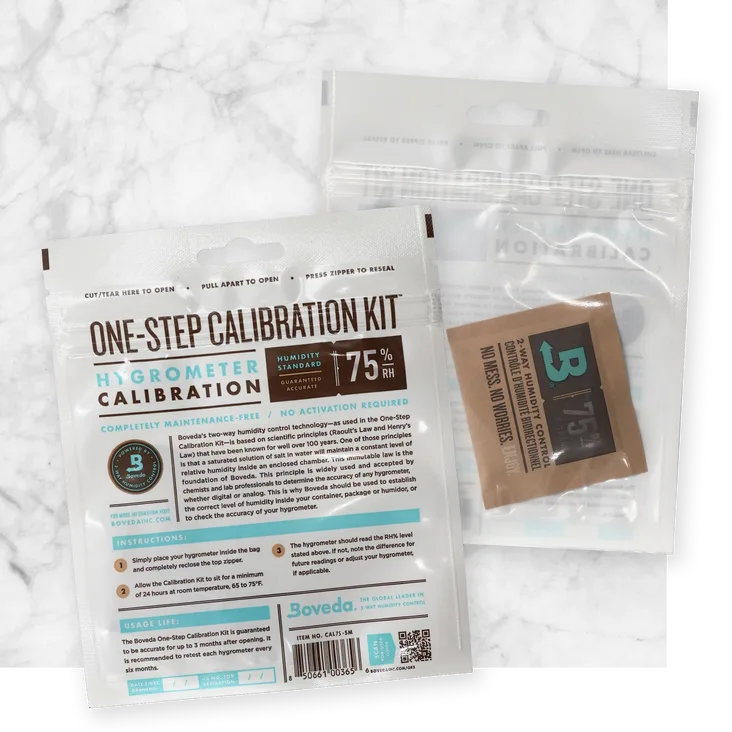
Yes, Boveda calibration kits use a sealed pouch that maintains 75% RH. They're more expensive than the salt test but more convenient. The salt test is equally accurate when done correctly.
What accuracy should I aim for?
For general use, ±3% RH is fine. For cigar humidors or incubators, aim for ±1% to ±2%. For casual room monitoring, ±5% is acceptable.
Check your device's stated accuracy and compare it to your needs.
My hygrometer reads 99% all the time. Is it broken?
Probably. A reading stuck at 99% often means the sensor has failed or the battery is low. Try a fresh battery first.
If that doesn't fix it, the sensor is likely damaged from condensation or age. Replace the unit.
Can I calibrate a hygrometer without a salt test?
You can use a commercial calibration kit like Boveda, or you can send the device to a professional calibration lab. For most people, the salt test is the most practical and affordable option.