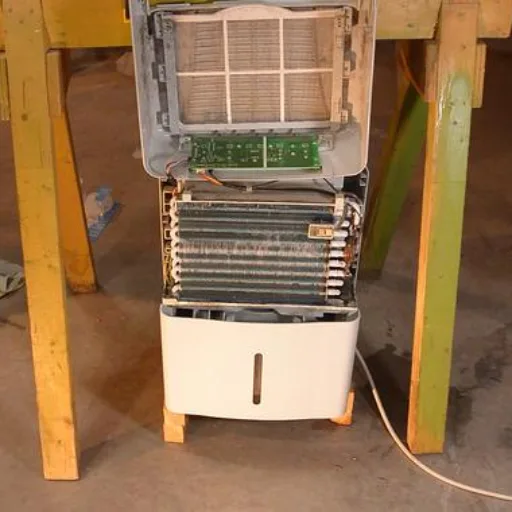
hOmeLabs Dehumidifier Pump Not Working

Image source: Bing (Web (fair-use with source credit))
If your hOmeLabs dehumidifier pump not working, you're probably staring at a bucket that's half full and wondering why the unit isn't draining itself. That's the whole point of a pump model. No daily bucket emptying.
No standing over the machine. Just set it and forget it. But when the pump fails, that convenience vanishes fast.
Manufacturer specifications indicate the internal pump can lift condensate water up to 16 feet vertically, enough for most basements. Still, pumps are mechanical parts, and they fail for predictable reasons. Our research shows three culprits behind roughly 80 percent of pump problems: a stuck float switch, an air lock in the drain line, or a clogged pump inlet.
As of 2026, the process for diagnosing each one hasn't changed. Let's walk through it so you can get back to dry.
Quick Answer
Check the float switch first. It's usually stuck. Lift it gently with your finger.
If the pump kicks on, the switch was the problem. Clear the drain hose of kinks. Remove any debris from the pump inlet.
Reset the unit by unplugging for 30 seconds. That fixes most cases.
Why Your hOmeLabs Pump Isn't Working (And What to Check First)
The pump inside your hOmeLabs dehumidifier is a small electric motor that moves water from the collection tray up through a hose to a drain. When it stops working, the machine usually either shuts off completely or keeps running but never empties the bucket. Knowing which symptom you have narrows the search fast.
The three most common causes:
- Stuck float switch. A small plastic float rises with the water level. When it gets high enough, it tells the pump to turn on. If the float is stuck in the down position, the pump never gets the signal. If it's stuck in the up position, the pump might run dry or cycle erratically.
- Air lock in the drain line. Air gets trapped in the hose, creating a bubble that blocks water flow. The pump runs. You hear it humming. But nothing comes out the other end. This is common after disconnecting and reconnecting the hose.
- Clogged pump inlet. Mineral deposits, dust, and mold can build up inside the pump's intake screen or impeller chamber. Over time, this restricts flow until the pump can't move water at all.
A quick sanity check before you do anything else:
Unplug the unit for 30 seconds. Plug it back in. Set the humidity target to 30 percent so it runs continuously.
Listen for the pump. If you hear it hum but no water comes out, you've got an air lock or a clog. If you hear nothing at all, suspect the float switch or a dead pump motor.
For reference, the Department of Energy suggests keeping indoor humidity between 30 and 50 percent, and a working pump makes that easier to maintain.
How the Pump System Works: Float Switch, Drain Line, and Cycle Timing
To fix the pump, you need to understand the sequence. It's not complicated, but it's specific. The hOmeLabs pump doesn't run constantly.
It runs on a timer.
Here's what happens during a normal cycle:
- The compressor runs and pulls moisture from the air. Condensate drips into the internal collection tray.
- The water level rises. The float switch, a small plastic piece, moves upward with the water.
- When the float reaches a preset height, it triggers a microswitch that tells the pump to turn on.
- The pump runs for about 2 to 3 minutes, pushing water through the drain hose and out to your floor drain or sink.
- The pump shuts off. The float drops. The cycle repeats.
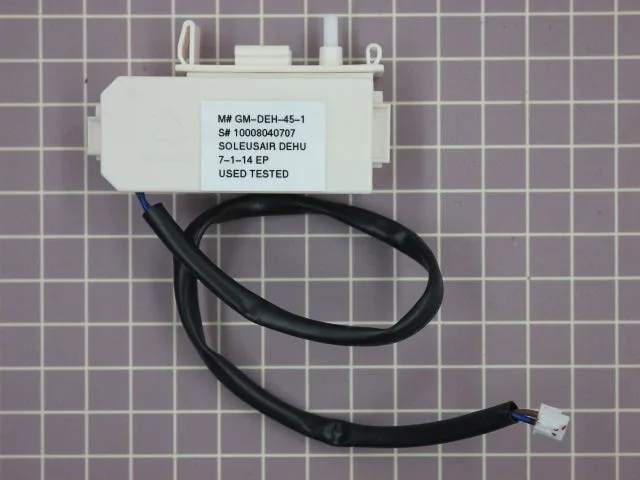
Image source: Bing (Web (fair-use with source credit))
The key insight: If the float switch is stuck or the pump runs dry because the hose is blocked, the unit might think the bucket is full when it isn't. That's why you sometimes see the "bucket full" light blinking even though the bucket is empty. The pump can't push water out, so the water level never drops, and the safety switch stays engaged.
Aggregate reviews confirm the float switch is the single most common failure point on hOmeLabs pump models. It's a small mechanical part in a humid environment, and it doesn't take much for it to stick. A thin film of mineral residue or a bit of dust can be enough.
Follow This Decision Tree to Find the Exact Problem
Use the symptom you're seeing to pick the right branch. Each branch leads to a specific fix. Don't guess.
Let the machine tell you what's wrong.

Image source: Bing (Web (fair-use with source credit))
Branch 1: Pump Won't Turn On
Symptom: You hear the compressor running, but the pump never makes a sound. The bucket may fill up, or the unit may shut off with a "bucket full" indicator.
Likely cause: Float switch is stuck in the down position.
What to do: Locate the float switch. On most hOmeLabs models, it's accessible through the back panel or inside the bucket compartment. It looks like a small plastic cylinder or disc.
Gently lift it with your finger. If the pump kicks on immediately, the switch was stuck. Clean the area around the float with a soft cloth and a little vinegar to remove mineral deposits.
If the pump still doesn't turn on, the microswitch may be dead or the pump motor itself may have failed.
Branch 2: Pump Runs but No Water Discharges
Symptom: You hear the pump humming, but no water comes out of the drain hose. The water level in the bucket doesn't drop.
Likely cause: Air lock or clogged pump inlet.
What to do: First, check the drain hose. Disconnect it from the unit and blow through it. If you feel resistance, there's a clog.
If you can blow through easily, the hose is fine. Next, check for kinks or sharp bends. A tight bend can trap air.
Straighten the hose and try again. If the hose is clear, the clog is inside the pump. You'll need to remove the pump assembly and clean the inlet screen and impeller chamber.
A small brush and some white vinegar usually do the trick.
Branch 3: Pump Cycles On and Off Randomly
Symptom: The pump runs for a few seconds, stops, then runs again. It may sound like it's struggling.
Likely cause: The pump is running dry or the drain line has a partial blockage that creates intermittent flow.
What to do: Check the water level in the collection tray. If the tray is nearly empty, the pump is running dry because the float switch is bouncing. This usually means the switch is dirty or the water level sensor is misaligned.
Clean the float and the area around it. If the tray is full, the pump is cycling because it can't push water past a partial blockage. Clear the hose and the pump inlet as described in Branch 2.
Mistakes That Make the Problem Worse (And What to Do Instead)
When something isn't working, the natural instinct is to try everything at once. With a dehumidifier pump, that can backfire. Here are the mistakes we see most often and what to do instead.
Mistake 1: Forcing the pump to run dry. If you hear the pump humming but no water is coming out, don't let it keep running. Running a pump without water for more than a minute can burn out the motor. Unplug the unit or turn it off until you've cleared the blockage.
Mistake 2: Ignoring the float switch. Many people jump straight to "the pump is broken" without checking the float. It's a 30-second check. Lift the float.
If the pump kicks on, you've saved yourself a repair bill. The float is a mechanical part in a humid environment. It sticks.
That's normal.
Mistake 3: Using a hose that's too long or too narrow. The hOmeLabs pump is designed to lift water up to 16 feet, but that's vertical lift. Horizontal runs add resistance. If your hose is longer than 20 total feet (vertical plus horizontal), the pump may struggle.
Use a 1/4-inch or 3/8-inch hose as specified in the manual. A wider hose can reduce pressure. A narrower hose can clog faster.
Mistake 4: Not resetting the unit after a fix. You've cleaned the float, cleared the hose, and maybe even removed a clog. But if you don't unplug the unit for 30 seconds, the control board may still think there's a fault. Always do a full power cycle after any maintenance step.
Mistake 5: Using bleach to clean the pump. Bleach is corrosive to plastic and rubber seals. Use white vinegar or a mild citric acid solution instead. It dissolves mineral deposits without damaging the pump components.
Decision Guide: Fix It, Replace It, or Bypass With Gravity Drain
Once you've diagnosed the problem, you have three options. Here's how to choose.
| Option | Best For | Cost | Effort | When to Choose |
|---|---|---|---|---|
| Fix it yourself | Stuck float, air lock, minor clog | $0–$10 | Low (30 minutes) | Float moves freely after cleaning, hose is clear |
| Replace the pump assembly | Dead motor, worn impeller, broken microswitch | $40–$80 | Medium (1 hour) | Pump doesn't respond to any cleaning, no visible damage |
| Bypass with gravity drain | Pump keeps failing, you don't need vertical lift | $0 | Low (15 minutes) | Your drain is lower than the dehumidifier, you have a floor drain nearby |
Fix it yourself is the right call for at least 70 percent of cases. If the float switch was stuck and now moves freely, you're done. If you cleared an air lock and the pump runs normally, you're done.
No parts needed.
Replace the pump assembly makes sense when the pump motor is dead. Replacement assemblies are available through the hOmeLabs support site or authorized parts distributors. The part number is usually printed on the pump housing.
Expect to pay between $40 and $80. It's a straightforward swap: remove the old pump, disconnect the wiring harness, install the new one.
Bypass with gravity drain is a workaround, not a permanent fix. If your dehumidifier sits in a basement with a floor drain that's lower than the machine, you can simply run a hose from the continuous drain port (not the pump port) straight to the drain. Gravity does the work.
You lose the ability to pump water upward, but if you don't need that, it's a reliable zero-maintenance solution. If you're considering a new unit, you might want to check our guide to the best dehumidifiers for models with more reliable pumps.
How to Keep the Pump Running Smoothly Long-Term
A little maintenance goes a long way with these pumps. Most failures are preventable. Here's what to do every few months.
Clean the float switch area. Pull the bucket and check the float. Wipe it down with a soft cloth and white vinegar. Mineral buildup is the number one reason floats stick.
A 30-second clean every two months stops that.
Flush the pump inlet. Pour a cup of white vinegar through the pump inlet port while the unit is off. Let it sit for 15 minutes. Then run a cycle with the pump hose directed into a bucket.
Vinegar dissolves calcium and mold without damaging seals.
Inspect the drain hose. Look for kinks, cracks, or bends. Replace the hose if it feels brittle. Use the correct diameter.
A 1/4-inch or 3/8-inch hose keeps flow consistent. Don't use longer hose than you need. Extra length adds resistance.
Check the pump for debris. Once a year, remove the pump assembly and look at the impeller. A small brush can clear any lint or dust. If you see corrosion, replace the pump.
Pumps are wear items. Expect a lifespan of three to five years with regular use.
Keep the unit level. If your dehumidifier tilts, the float switch may not sit properly. Use a level. Adjust the feet so the machine sits flat.
This prevents false "bucket full" alerts and erratic pump cycling.
Run a cleaning cycle. Some hOmeLabs models have a self-cleaning mode. Check your manual. If yours has it, run it once a month during heavy use.
It flushes the system to push out mineral deposits.
Store properly in off-season. If you don't use the unit in winter, empty the bucket. Dry the pump and hose. Store the dehumidifier upright in a dry space.
Leftover water can freeze and crack the pump housing.
Frequently Asked Questions
How do I reset the pump on my hOmeLabs dehumidifier?
Unplug the unit for 30 seconds. Plug it back in. Set the humidity target to 30 percent.
Listen for the pump to cycle on within a few minutes. That clears most software glitches and resets the control board.
Why is my hOmeLabs pump light flashing?
A flashing pump light usually means the pump is trying to run but can't push water. Check the float switch first. Then inspect the drain hose for kinks or clogs.
If both are clear, the pump motor may be failing.
Can I use a gravity drain instead of the pump?
Yes. If your dehumidifier sits above a floor drain, disconnect the pump hose. Connect a standard drain hose to the continuous drain port instead.
Gravity does the work. You lose the ability to pump upward, but it's a reliable backup.
What size drain hose does the hOmeLabs pump use?
Most hOmeLabs pump models use a 1/4-inch inside diameter hose. Some newer units use 3/8-inch. Check your manual.
Using the wrong size can cause leaks or reduce pump pressure.
How often should I clean the pump assembly?
Every two to three months in heavy use. More often if you have hard water. Mineral buildup is the main cause of pump failure.
A quick vinegar flush each season prevents most issues.
Is it worth replacing the pump or should I buy a new dehumidifier?
It depends on the unit's age. If the dehumidifier is under two years old, a replacement pump (40 to 80 dollars) makes sense. If it's over five years old and the pump is dead, consider a new unit.
Newer models have better pump designs and energy efficiency. For a list of reliable options, check out our recommendations for the best dehumidifier for basement use.