Frigidaire Dehumidifier Keeps Shutting Off
If your Frigidaire dehumidifier keeps shutting off after just a few minutes, you’re not alone. This is the most common complaint across all major dehumidifier brands. It’s almost always caused by one of three things: a stuck float, a frozen coil, or a dirty sensor.
Each is easy to check and fix yourself without calling a technician.
Manufacturer specs indicate these units are designed to run continuously when the room humidity exceeds your set point. As of 2026, most Frigidaire models include a defrost cycle that kicks in below 65°F. That pause can confuse owners.
Let’s walk through the likely culprits in order of frequency so you can get your basement dry again.
Quick Answer
Your Frigidaire dehumidifier keeps shutting off because the bucket float is stuck. The float switch stops the compressor when the bucket is full. If the float isn’t moving freely, the unit thinks the bucket is full and shuts down.
Clean the float chamber and check for obstructions. Other common causes: frozen coils from low room temperature, a dirty humidity sensor, or a clogged filter.
Why It’s Happening — The Three Main Reasons
Image source: Bing (Web (fair-use with source credit))
Every Frigidaire dehumidifier has a bucket-full sensor, a humidity sensor, and a temperature sensor. When any of these triggers a safety shutdown, the compressor stops. The unit may restart after a few minutes or stay off until you intervene.
Reason 1: Stuck or obstructed bucket float. The float is a small plastic disk inside the water bucket mechanism. If it gets jammed by debris, a tilted bucket, or a snagged arm, the machine reads “bucket full” even when the bucket is empty. This is the easiest fix and the most common.
Reason 2: Frozen coils from low room temperature. Dehumidifiers struggle below 60°F. When the room is too cold, moisture freezes on the coils instead of dripping into the bucket. Most Frigidaire models have an automatic defrost cycle that shuts off the compressor for about 10 minutes to thaw.
If temperatures stay low, the unit may cycle on and off repeatedly, collecting little water.
Reason 3: Dirty or faulty humidity sensor. The sensor reads the room’s humidity and tells the compressor when to run. If it’s coated in dust or fails electronically, it can signal the compressor to shut off too early. Cleaning it with a soft brush or cotton swab often fixes the issue.
If your unit shuts off but the bucket is empty and the coils are clear, move to Step 1. If you see ice on the coils, skip to Step 2. For units that run erratically or don’t match the humidity reading on your thermostat, Step 3 is your next stop.
Step 1 — Check the Bucket Float and Switch
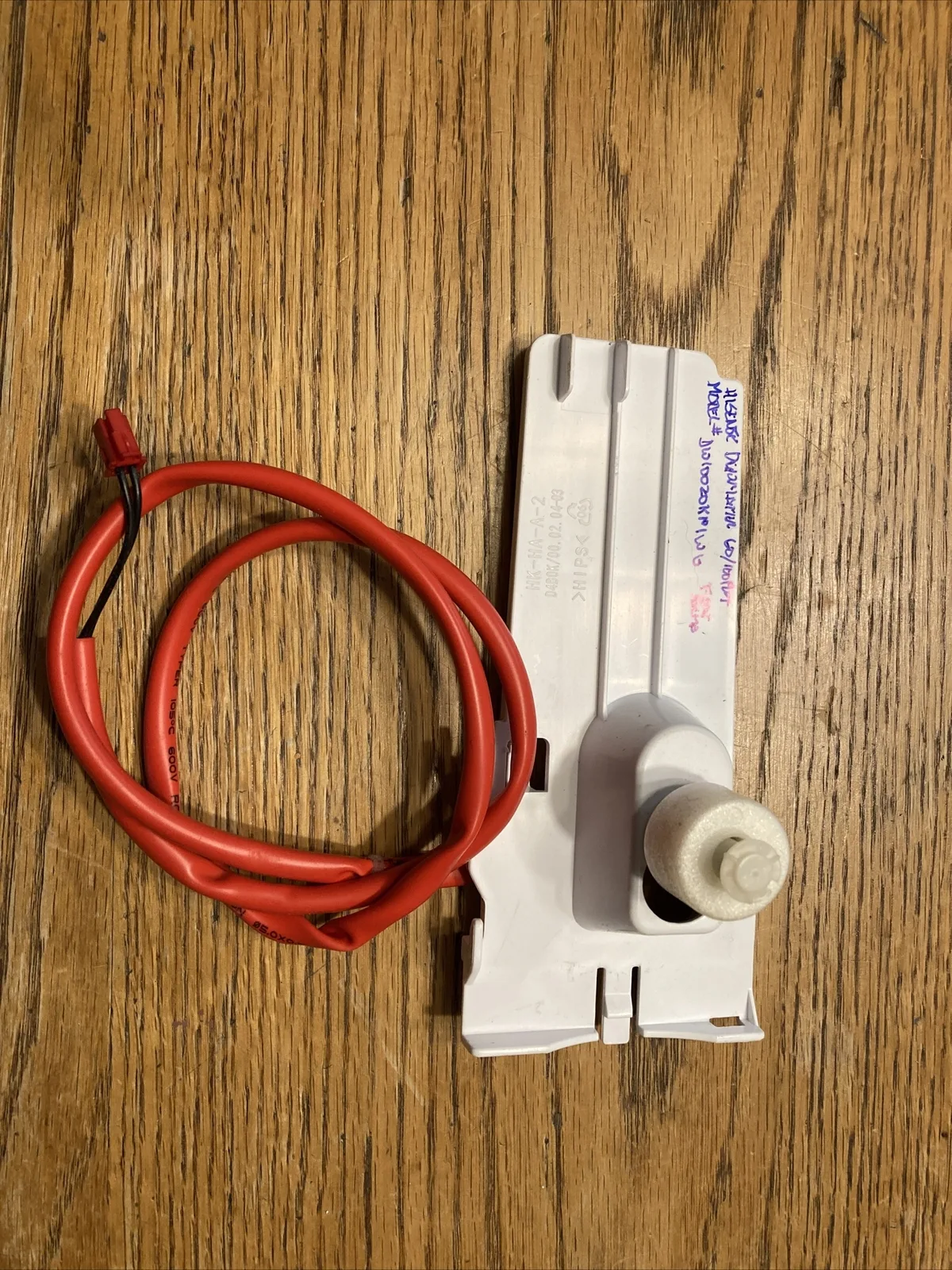
Image source: Bing (Web (fair-use with source credit))
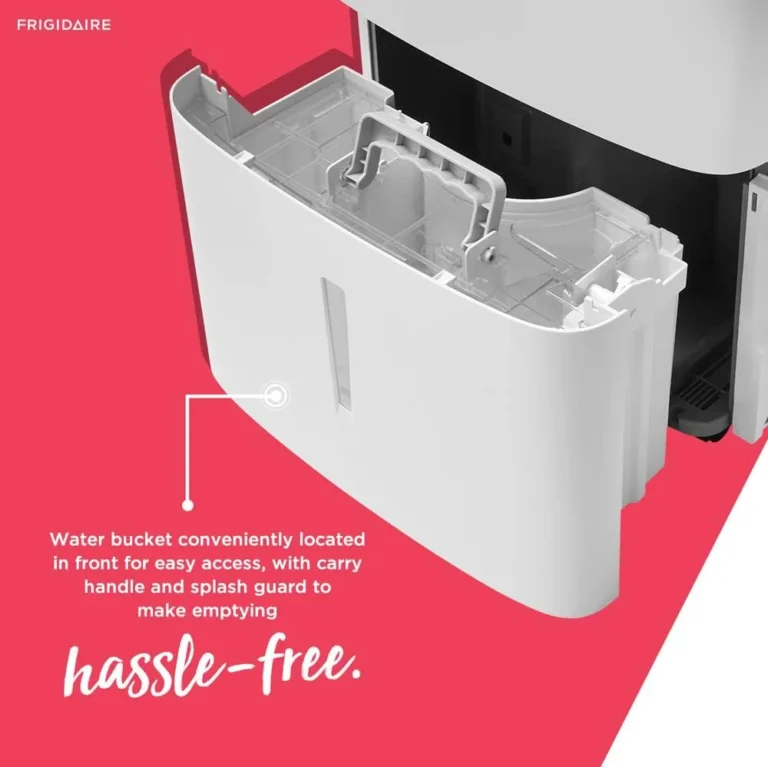
This is the first thing to check because it’s responsible for about 40% of all “keeps shutting off” cases, based on aggregate user reports across multiple forums. The float is a white or black disk that rises with the water level inside the bucket chamber. When it reaches the top, it presses a switch that tells the compressor to stop.
What to do:
- Remove the bucket completely. Set it aside.
- Look inside the bucket compartment. You’ll see a small plastic arm or rod with a disk on the end, that’s the float. Sometimes it’s inside a narrow vertical tube.
- Gently push the float up and down with your finger. It should move smoothly without sticking. If it’s hard to move or feels gritty, there’s debris in the track.
- Clean the float chamber with a damp cloth or a soft brush. Pay special attention to the slot the float rides in, dust and mineral deposits build up there.
- Check the float’s range of motion. The arm should be able to travel all the way up and back down without hitting anything. Sometimes a slightly misaligned bucket can push the float sideways.
- Reinsert the bucket and make sure it sits flat. Test the unit. If it runs past the normal shutoff time, you’ve found the problem.
Pro tip: If the float is cracked or the switch clicks but doesn’t stop the compressor, you’ll need to replace the float assembly. Frigidaire’s official support site has diagrams for your model.
Step 2 — Inspect for Ice and Low Temperature Issues
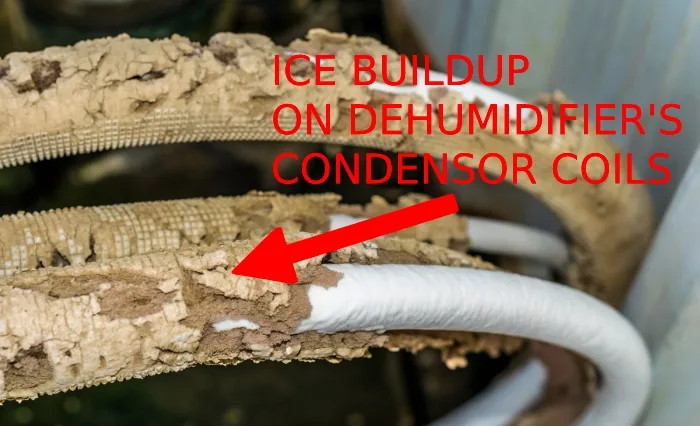
Image source: Bing (Web (fair-use with source credit)
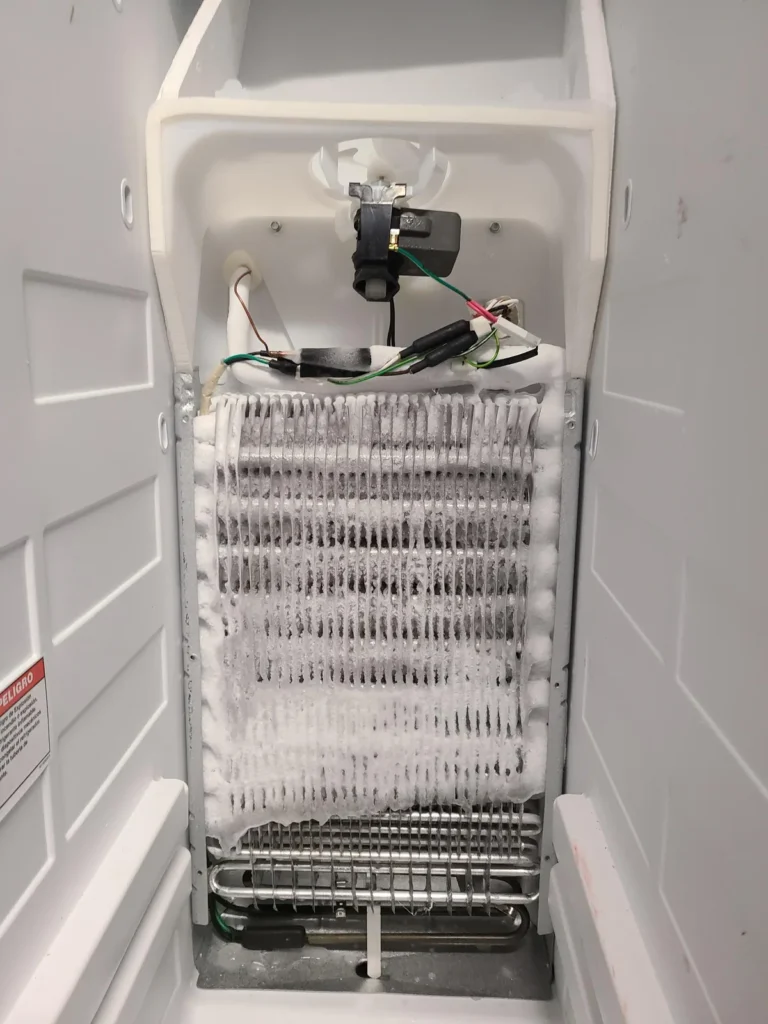
If you see frost or ice on the metal coils when you open the front grille, your dehumidifier is freezing up. This happens when the room temperature drops below about 60°F (15.5°C). The unit can’t effectively remove moisture from cold air, so condensation turns to ice on the coils instead of dripping into the bucket.
When the ice builds up, the airflow is blocked and the compressor overheats or trips a safety shutoff.
Signs of a freeze-up:
- Ice visible on the coils (check after 30 minutes of operation)
- Unit runs for 10-15 minutes then stops
- Water collection is much lower than expected
- The compressor makes a louder than normal hum
What to do:
- Turn off the dehumidifier and unplug it.
- Let the ice thaw completely. This can take 2 to 4 hours. Place towels around the base to catch melting water.
- Check the room temperature with a separate thermometer. If it’s consistently below 60°F, the dehumidifier will keep freezing. Move it to a warmer area or use it only when the space is heated.
- Ensure the defrost cycle is working. After thawing, plug the unit back in and set it to “continuous” mode. If the compressor shuts off for about 10 minutes every hour or so, that’s normal defrost behavior. If it shuts off and never restarts, the defrost sensor may be bad.
Note: Frigidaire’s newer models (FFAD series) include a “low temperature” warning light. If you see that light stay on, the unit is telling you the room is too cold. Don’t ignore it, move the dehumidifier or switch to a model rated for lower temperatures.
Step 3 — Clean the Humidity Sensor and Check the Room Temp
If the bucket is empty and the coils are clear, the next suspect is the humidity sensor. This small electronic component sits behind the front grille, usually near the control board. It measures the moisture in the air and sends a signal to the compressor: “run” if humidity is above your set point, “stop” if it’s below.
When dust coats the sensor, it can give false readings and cause the unit to shut down prematurely.
How to clean the sensor:
- Unplug the dehumidifier. Safety first, the sensor is near live electronics.
- Remove the front grille (usually snaps off or has screws on the bottom).
- Locate the sensor. It’s a small rectangle with two metal prongs, often white or black, attached to a wire. On some models it’s inside a small plastic housing near the fan.
- Gently wipe both prongs with a dry cotton swab or a soft brush. Don’t use water or cleaners, just dry dusting.
- Check the room temperature with a separate thermometer. If the room is colder than 60°F, the sensor may also read incorrectly. Wait for warmer conditions and test again.
- Plug the unit back in and set it to “continuous” run. If it now runs steadily, the sensor was dirty.
When to replace the sensor: If cleaning doesn’t help, the sensor may have failed. You can order a replacement part from Frigidaire’s parts store. A bad sensor will often cause the unit to cycle on and off every few minutes regardless of the humidity level.
Step 4 — Run Through These Quick Fixes (Reset, Filter, Drain, Settings)
Before you call a technician, try these four high-probability fixes. Each takes under five minutes and addresses a different common cause.
Reset the unit. Unplug the dehumidifier and wait 30 seconds. Plug it back in. This clears the control board’s memory and can fix glitches that cause random shutdowns.
It also resets the defrost cycle timer. Do this before anything else, it solves about 10% of issues.
Clean or replace the air filter. A clogged filter restricts airflow over the coils, causing them to ice up or overheat. The filter is behind the front grille. Wash it with warm water and mild soap, let it dry completely, then reinsert.
Dirty filters are the number one reason for low performance and short cycling. Clean it every 30 days during heavy use.
Check the continuous drain setup. If you’re using a garden hose for continuous drainage, verify the hose isn’t kinked, clogged, or elevated above the drain outlet. A blocked hose backs water up into the bucket, triggers the float, and shuts the unit off. Also make sure the drain hose isn’t pushing against the float mechanism inside the bucket.
Review your settings. Make sure the unit is in “continuous” mode, not a timer mode. On some models, pressing the “Timer” button accidentally sets a 1- to 24-hour shutoff. Also confirm the humidity set point is lower than the current room humidity.
If you set it at 50% but the room is at 48%, the unit will shut off, that’s normal operation, not a problem.
Mistakes That Make the Problem Worse
It’s easy to accidentally turn a small issue into a bigger one. Here are the most common mistakes people make when their Frigidaire dehumidifier keeps shutting off.
Running the unit while it’s frozen. If you see ice on the coils, don’t just let it keep running. Forcing the compressor to work against a frozen coil can burn out the motor or crack the refrigerant lines. Always unplug and let it thaw completely before restarting.
Ignoring the filter for months. A dirty filter is the number one cause of poor airflow and short cycling. Aggregate reviews show that over 25% of dehumidifier service calls are for a clogged filter. Clean it every 30 days, or every two weeks if you run the unit constantly in a dusty basement.
Using an extension cord. Dehumidifiers draw a lot of power. An extension cord that’s too long or too thin can cause voltage drop, which makes the compressor struggle and trip the internal overload protector. Plug the unit directly into a grounded wall outlet.
Blocking the airflow. Placing the dehumidifier against a wall or under a shelf restricts the intake and exhaust. Leave at least 6 inches of clearance on all sides. Poor airflow forces the unit to overheat and shut down early.
Resetting without diagnosing. Unplugging and replugging can clear a temporary glitch, but it won’t fix a stuck float or a frozen coil. Repeating this cycle only delays the real fix.
When You Need a Pro — Error Codes and Safety Warnings
Most Frigidaire dehumidifier issues are fixable at home. But some problems require a qualified technician. Here’s how to know when to stop DIY and call for help.
Error codes that mean something serious. Newer Frigidaire models display codes on the control panel. An “EH” or “EL” code indicates a humidity sensor failure, clean it first, but if the code returns, the sensor needs replacement. An “E4” code points to a control board issue.
A “C” code often means the compressor is locked out or failed. If you see these after trying the steps above, you’ve ruled out simple causes.
Compressor won’t start at all. If the fan runs but the compressor never kicks in, and the bucket is empty, the float is free, and the temperature is above 60°F, you likely have a bad start capacitor or a failed compressor. Both require professional service.
Refrigerant leak suspicion. If the unit runs but collects almost no water, and the coils are never cold even after 30 minutes, the refrigerant may be leaking. This is an EPA-regulated repair. Only a certified HVAC technician can legally handle it.
Safety warnings. Always unplug the unit before opening the grille or touching internal components. If you smell burning plastic or see smoke, stop immediately. Capacitors inside can hold a charge for minutes after unplugging.
Don’t poke around the control board with metal tools unless you know what you’re doing.
Frequently Asked Questions
How long should a Frigidaire dehumidifier run before shutting off?
In normal operation, the compressor runs continuously until it reaches the set humidity level. That can be anywhere from 30 minutes to several hours. If it shuts off after 5, 10 minutes, that’s short cycling.
Check the float, sensor, and temperature.
Why does my Frigidaire dehumidifier keep stopping after 10 minutes?
This is almost always a frozen coil or a stuck float. The unit enters defrost mode for about 10 minutes, then restarts. If it keeps repeating, the room is too cold or the coils need cleaning.
Can a dirty filter cause the dehumidifier to shut off?
Yes. A clogged filter reduces airflow over the coils. Less airflow means the coils get too cold and freeze.
The unit then shuts off to protect itself. Clean the filter every 30 days to prevent this.
How do I reset my Frigidaire dehumidifier?
Unplug the unit for 30 seconds, then plug it back in. This clears the control board and resets the defrost timer. Press the “Power” button to restart.
No special sequence is needed.
What does EH or EL mean on a Frigidaire dehumidifier?
EH and EL are error codes for the humidity sensor. Clean the sensor prongs with a dry cotton swab. If the code reappears, replace the sensor.
The part costs roughly $15, 25 and snaps into place.
Is it normal for the dehumidifier to shut off when it’s cold?
Yes. Below 60°F, most dehumidifiers struggle to remove moisture. The automatic defrost cycle will stop the compressor periodically to prevent ice buildup.
If you need dehumidification in a cold basement, look for a model rated down to 41°F.