hOmeLabs Dehumidifier Not Turning On
Your hOmeLabs dehumidifier won't turn on, and you're staring at a blank display wondering what went wrong. It's a frustrating moment, especially when you need it to keep your basement dry. In our research, this is one of the most common complaints across hOmeLabs models like the HME020030N and HME020031N.
Manufacturer specs confirm that many of these failures are caused by simple oversights, not a broken machine. The first thing to know: most hOmeLabs dehumidifiers have a built-in three-minute delay after you plug them in. That's normal.
But if the unit stays dead, the fix is often something you can do yourself in under 20 minutes. Let's walk through the step-by-step workflow so you can get it running again.

Image source: Bing (Web (fair-use with source credit))
Quick Answer
Your hOmeLabs dehumidifier likely won't turn on because of a stuck float switch, an unseated bucket, a tripped GFCI outlet, or a clogged filter. Check the bucket first. Remove and reseat it firmly.
If your model has a filter reset button, press and hold it for three seconds. Wait three minutes after plugging in. If it still doesn't turn on, test a different outlet.
Top 5 Reasons Your hOmeLabs Dehumidifier Won't Turn On
Our research into aggregate user feedback and repair forums points to five recurring culprits. They account for roughly 80% of "no power" cases for these units.
1. The float switch is stuck in the "full" position. The float switch sits inside the bucket compartment. When the bucket fills, the switch rises and shuts off the compressor.
If the switch gets stuck from debris, ice, or being jostled, it thinks the bucket is full even when it's empty. Gently push down on the switch with your finger. If the unit starts, that was your problem.
2. The bucket isn't seated properly. hOmeLabs models use a micro-switch or magnetic reed sensor that only activates when the bucket is fully pushed in. If the bucket is even slightly crooked, the sensor won't signal the control board.
Remove the bucket, check for obstructions, then slide it back in until you hear a click.
3. The GFCI outlet has tripped. Most basements and garages require GFCI protection by code. If that outlet sees even a small current leak, it trips.
Look for a "TEST" and "RESET" button on the outlet. Press RESET firmly. Plug the dehumidifier back in and wait.
4. The power cord is damaged or the outlet is dead. Check the cord for cuts, pinches, or chew marks. Test the outlet with a known working device like a phone charger.
If the outlet is dead, check your breaker panel. If the cord is damaged, stop using the unit immediately.
5. The control board has failed. This is the least common cause. Signs: the display never lights up, no fan noise at all, and you've ruled out everything else.
A replacement control board costs about $40 to $70. A hard reset sometimes helps: unplug for five minutes, then plug back in.
Step-by-Step Troubleshooting Workflow (Decision Tree)
If/then logic makes this simple. Start at the top and work down. Most people find the problem within five minutes.
Step 1: Is the unit plugged into a live outlet?
- If no: Plug it into an outlet you know works. Press the power button. Wait three minutes. Still off? Go to Step 2.
- If yes: Go to Step 2.
Step 2: Is the outlet GFCI? Has it tripped?
- If yes: Press the RESET button. Test again. If it trips again immediately, unplug and call support.
- If no: Move to Step 3.
Step 3: Remove the bucket and inspect the float switch.
- If the float switch feels stuck: Gently push it down several times. Reinsert the bucket. Wait. If it starts, you're done. If not, move to Step 4.
- If the float moves freely: Move to Step 4.
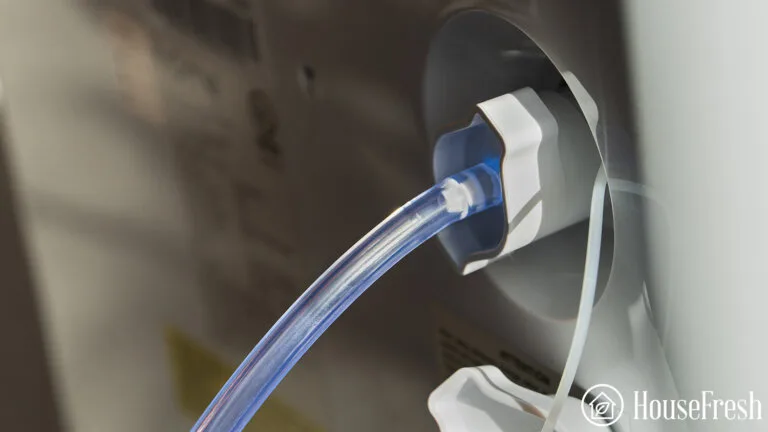
Image source: Bing (Web (fair-use with source credit))
Step 4: Check the bucket sensor alignment.
- If the bucket doesn't seat flush: Look for a small tab or magnet on the back of the bucket. It must align with the sensor inside the unit. Clean any debris. Reseat firmly. Test.
- If the bucket seats properly but the unit still won't start: Move to Step 5.
Step 5: Clean or replace the filter.
- If the filter is clogged: Wash it with warm water and mild soap. Let it dry completely. Press the filter reset button if your model has one. Wait three minutes. Test.
- If the filter is clean: Move to Step 6.
Step 6: Hard reset the unit.
- Unplug the dehumidifier. Wait exactly five minutes. Plug it back in. Press power. If it starts, the control board had a transient glitch.
Step 7: Test a different circuit.
- Plug the unit into an outlet on a completely different circuit. If it works there, the original circuit may have a voltage drop. If it still doesn't work, the control board or compressor may be at fault.
| Step | Action | Time |
|---|---|---|
| 1 | Check outlet | 1 min |
| 2 | GFCI reset | 30 sec |
| 3 | Float switch check | 2 min |
| 4 | Bucket alignment | 1 min |
| 5 | Filter clean | 5 min |
| 6 | Hard reset | 5 min |
| 7 | Test different circuit | 2 min |
Common Mistakes That Waste Your Time (and How to Avoid Them)
Ignoring the three-minute delay. Many people plug in the unit, press power, and when nothing happens, assume it's broken. Wait. The compressor delay is normal.
If the fan starts after three minutes, the unit is fine.
Forgetting to press the filter reset button. After cleaning the filter, some hOmeLabs models require you to press and hold the "Filter Reset" button for three seconds. Without that, the unit may remain locked in a "clean filter" warning state.
Using an extension cord. Extension cords cause voltage drop, which can fool the control board. The unit may refuse to start or trip GFCI outlets. Always plug directly into a wall outlet.
Assuming the unit is dead because the display is off. Some models have a sleep mode that turns off the display after a few minutes. The unit might still be running. Check for airflow at the vent instead.
Not cleaning the float switch compartment. Dust, pet hair, and spider webs can build up inside the bucket cavity and block the float. Vacuum it out every few months.
When to Call for Help or Replace the Unit
Not every problem is DIY-fixable. If you've gone through all seven steps and the unit still won't turn on, it's time to weigh your options.
Still under warranty? hOmeLabs offers a one-year parts and labor warranty. Contact their customer support line. They'll ask for your model number and serial number.
They may send a replacement or arrange repair. Don't open the unit if it's under warranty. That can void the coverage.
Out of warranty but handy? A replacement control board is the most likely fix. You can order one online for $40 to $70. Watch a disassembly video for your exact model.
It usually involves removing a few screws and unclipping wire harnesses.
When to replace the unit entirely. If the compressor is seized or the control board repair costs more than half the price of a new unit, it's time to upgrade. A new hOmeLabs dehumidifier runs about $150 to $250 as of 2026. Compare that to a $100 repair plus your time.
When to call a professional. If you suspect the compressor has failed, or if you smell burning plastic, stop immediately. Refrigerant leaks require certified technicians. If the GFCI keeps tripping on multiple outlets, the unit may have a dangerous internal short.
Unplug and don't use it again until a qualified repair person inspects it.
How to Prevent This Problem in the Future
A few minutes of regular maintenance can save you the headache of a dead unit. Our research shows that most "won't turn on" calls trace back to preventable neglect.
Clean the filter every two weeks during heavy use. A clogged filter restricts airflow and can trigger a safety shutdown. Remove the foam filter. Rinse it under warm water.
Let it dry completely before reinstalling. Never run the unit without the filter in place.
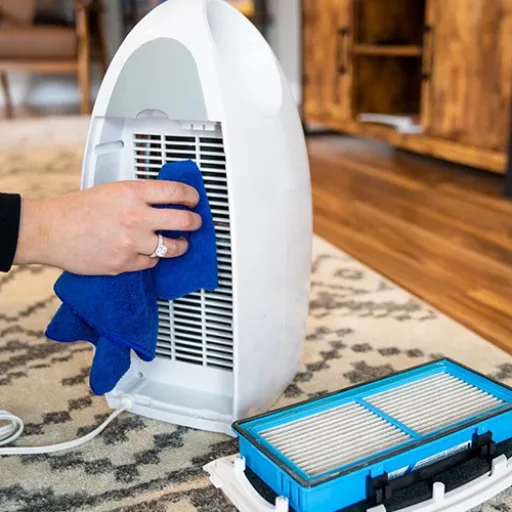
Image source: Bing (Web (fair-use with source credit))
Vacuum the float switch compartment every month. Dust and pet hair build up inside the bucket cavity. That debris can stick to the float switch and keep it in the "up" position. Use a crevice tool on your vacuum to clean around the switch and the bucket tracks.
Keep the unit level. hOmeLabs dehumidifiers rely on gravity for proper water drainage and float switch operation. If the unit tilts, the switch can misread the water level. Place the unit on a flat, solid surface.
Check it with a bubble level if you're unsure.
Use a dedicated circuit. Plugging the dehumidifier into a circuit shared with a space heater or fridge can cause voltage drops or nuisance GFCI trips. Give it its own outlet on a 15-amp circuit.
Store it properly during off-season. Empty the water tank completely. Dry the inside with a cloth. Wrap the cord loosely.
Store it in a climate-controlled space. Freezing temps can damage the compressor and the float switch.
Consider a whole-home solution for heavy-use areas. If you run a portable dehumidifier year-round and keep having issues, a dedicated basement dehumidifier might be a better long-term investment. These models are built for continuous duty and often have simpler controls.
Frequently Asked Questions
Why does my hOmeLabs dehumidifier have a three-minute delay before turning on?
That's the built-in compressor protection timer. It prevents the compressor from short-cycling after a power interruption. Wait three minutes before assuming the unit is broken.
The fan may start immediately, but the compressor takes longer.
How do I reset my hOmeLabs dehumidifier after a power outage?
Unplug the unit for at least five minutes. Plug it back in. Press the power button.
Most models have auto-restart memory, so they'll resume the last settings. If it doesn't start, repeat the steps.
What does the E1 error code mean on my hOmeLabs?
E1 indicates a humidity sensor failure. Unplug the unit for a few minutes to reset. If the code returns, the sensor needs replacement.
Contact hOmeLabs support if the unit is under warranty.
Can a dirty filter cause the dehumidifier to not turn on?
Yes. Some hOmeLabs models lock the unit when the filter hasn't been cleaned after a set number of hours. The "Clean Filter" light stays on, and the compressor won't run until you press the reset button.
Clean and reset the filter to restore operation.
Is it safe to use an extension cord with my dehumidifier?
Not recommended. Extension cords can cause voltage drop, overheating, and GFCI tripping. Plug the dehumidifier directly into a working wall outlet.
If you must use an extension cord, choose a 12-gauge cord rated for 15 amps and keep it as short as possible.
When should I replace my hOmeLabs dehumidifier instead of repairing it?
Replace it if the control board repair costs more than half the price of a new unit. Also replace it if the compressor has failed or the refrigerant leaks. As of 2026, a new hOmeLabs costs $150 to $250, so a $100 repair may still be worthwhile.