Why Is My Dehumidifier so Loud
If you're wondering why is my dehumidifier so loud, you're not alone. That rattling, humming, or gurgling sound can be frustrating, especially when you're trying to sleep or watch TV in the same room. The good news is that most noisy dehumidifiers have a straightforward fix once you know what to listen for.
Manufacturer specifications indicate that a typical portable dehumidifier operates between 40 and 55 decibels. That's roughly the volume of a quiet conversation or a running refrigerator. If your unit sounds louder than that, something is likely out of balance or in need of maintenance.
Let's walk through the most common causes and how to troubleshoot them step by step.
Image source: Bing (Web (fair-use with source credit))
First, Is It the Compressor, the Fan, or the Water? Listening for the Source
Every dehumidifier makes some noise. The trick is figuring out which part is causing yours.
The compressor produces a steady low hum while it runs. If that hum turns into a loud buzz or a vibrating rattle, the compressor might be struggling or the unit could be sitting on an uneven surface. A bumpy hum that changes pitch usually means the compressor is working too hard.
The fan makes a whooshing or whistling sound when air moves through the unit. If you hear a clicking, scraping, or high-pitched whine, the fan blades may be hitting something. A loose blade or a piece of debris stuck in the fan housing can cause that noise.
Water movement creates gurgling, sloshing, or dripping sounds. Some of that is normal. But if you hear a loud thumping or a constant trickle, the drain line could be blocked or the internal pump might be cycling too often.
Listen carefully for a few minutes. Run the unit on each fan speed setting if you have one. Pay attention to whether the noise changes when the compressor kicks on or off.
That alone will point you toward the right fix.
Quick Answer: The Most Common Causes of a Noisy Dehumidifier
Most loud dehumidifiers have one of two problems. The unit is placed on an uneven surface, or the filter is dirty. Fix those two things first, and you'll solve the majority of noise complaints.
Here are the top reasons a dehumidifier gets loud:
- Dirty air filter restricts airflow, making the fan work harder and louder
- Unbalanced placement causes the whole unit to vibrate against the floor
- Loose screws or panels rattle when the compressor runs
- Ice buildup on coils creates hissing or popping as the unit defrosts
- A worn compressor produces a deep, grinding hum that gets worse over time
If you have a newer model and the noise just started, check the filter and the floor surface first. If the unit is several years old and getting louder gradually, the compressor bearings may be wearing out.
The Decision Tree: What Your Dehumidifier's Noise Is Telling You
Not all noises mean the same thing. Use this simple guide to match the sound to the likely cause and the right action.
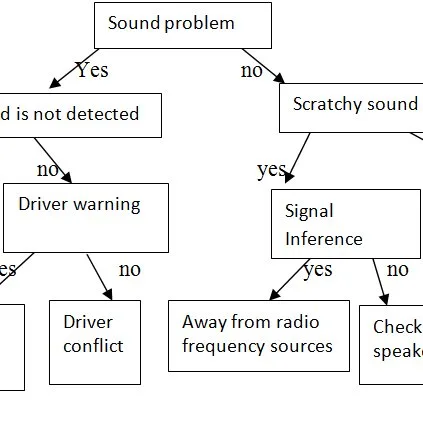
Image source: Bing (Web (fair-use with source credit))
| What you hear | What it likely means | What to do |
|---|---|---|
| Steady low hum | Normal compressor operation | Nothing needed |
| Loud buzzing or vibrating | Uneven surface or loose parts | Level the unit and tighten screws |
| Rattling or clicking | Debris in fan or loose panel | Inspect fan blades, remove debris |
| Hissing or sizzling | Ice buildup on coils | Defrost the unit, check room temperature |
| Gurgling or sloshing | Normal water movement | Check drain line for kinks |
| Thumping or knocking | Drain pump cycling or compressor issue | Inspect pump, call a technician if it persists |
| Whistling or high-pitched whine | Restricted airflow or dirty filter | Clean or replace the filter |
If the noise is only on high fan speed, try lowering the speed. That's a normal trade-off for more airflow. If the noise is constant regardless of speed, the issue is likely mechanical rather than airflow related.
If the noise stops when you lift the unit slightly, it's almost certainly a vibration problem. Put a rubber mat or vibration pad underneath to dampen the sound.
How to Quiet a Loud Dehumidifier, Step by Step
You can fix most noise issues yourself in under 15 minutes. Here's the process.
Step 1: Unplug the unit. Always disconnect power before opening any panel or touching internal parts.
Step 2: Check the floor. Place a level on top of the dehumidifier. If it's not perfectly level, adjust the feet or put a shim under the low corner. Even a small tilt can cause the compressor to vibrate against the housing.
Step 3: Clean the air filter. This is the most common fix. Remove the filter, wash it with warm water and mild soap, and let it dry completely before reinstalling. A clogged filter forces the fan to work harder, which makes the whole unit louder.

Image source: Bing (Web (fair-use with source credit))
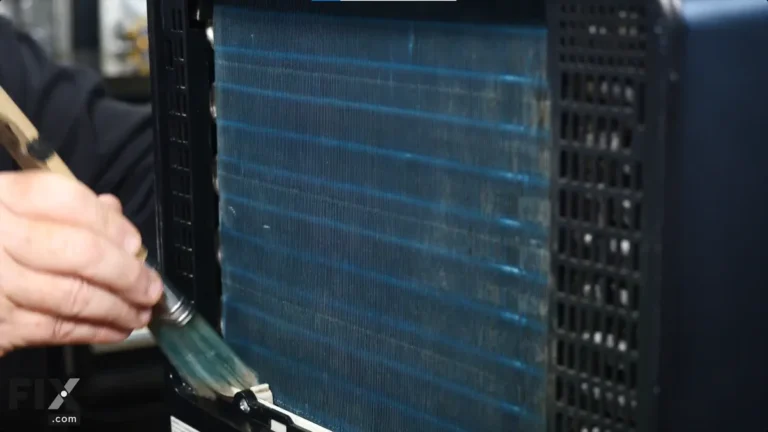
Step 4: Inspect the fan blades. Shine a flashlight through the intake grille. Look for any debris, dust clumps, or bent blades. If you see something, gently remove it with a soft brush or compressed air.
Step 5: Tighten all screws and panels. Check the front cover, back panel, and any side panels. Loose hardware rattles when the compressor runs. Use a screwdriver to snug everything up, but don't overtighten.
Step 6: Check for ice buildup. If the coils are frosted, turn the unit off and let it thaw completely. Icing often happens when the room temperature is below 65°F. That's too cold for a standard compressor dehumidifier to work properly.
Step 7: Test it. Plug the unit back in and run it on each fan speed. If the noise is gone, great. If it's still loud, move to the next step.
Mistakes That Make Dehumidifiers Louder (And How to Avoid Them)
Some common habits actually make your dehumidifier noisier over time. Here's what to stop doing.
Placing it on a hollow surface. A thin floor or an elevated platform amplifies every vibration. Put the unit directly on a solid concrete floor, or use a thick rubber mat to absorb the sound.
Running it in a room that's too cold. Compressor dehumidifiers need the room to be above 65°F to run efficiently. Below that, the compressor cycles on and off more often, and ice forms on the coils. That ice causes hissing and popping as it melts.
If your basement is cold, consider a desiccant dehumidifier instead.
Ignoring the filter for months. A dirty filter is the number one cause of excessive noise. Clean it every 30 days during heavy use. Mark it on your calendar if you have to.
Letting the water bucket overflow. If the float switch gets stuck, the unit keeps running even when the bucket is full. That can cause the pump to run dry, which makes a loud straining sound. Empty the bucket regularly and check that the float moves freely.
Blocking the intake or exhaust. Furniture, curtains, or walls within a few inches of the unit restrict airflow. Restricted airflow means the fan has to run faster and louder to move the same amount of air. Give your dehumidifier at least 12 inches of clearance on all sides.
Avoid these mistakes, and your dehumidifier will run quieter and last longer. Most of them are simple habits that take seconds to fix.
Dehumidifier Noise Levels: What's Normal, What's Not, and When to Repair vs. Replace
Most dehumidifiers run between 40 and 55 decibels. That's similar to a quiet conversation or a running fridge.
Noise above 60 dB starts to feel intrusive. It's about as loud as a normal conversation in a small room.
Here's a quick reference for what you're hearing:
| Noise level | Example | Verdict |
|---|---|---|
| 35-45 dB | Quiet library | Normal for low fan speed |
| 45-55 dB | Refrigerator hum | Normal for compressor operation |
| 55-60 dB | Loud office | Noticeable but acceptable |
| 60-70 dB | Vacuum cleaner | Likely a problem |
| 70+ dB | City traffic | Serious issue, repair or replace |
When to repair. If the unit is under warranty, contact the manufacturer first. Simple fixes like a dirty filter, loose screws, or a tilted base are free. If a technician can fix it for less than half the cost of a new unit, repair is the smart call.
When to replace. A grinding compressor or failing fan motor often costs more to fix than the unit is worth. Most dehumidifiers last around 8 years with regular maintenance. If yours is past that and getting loud, it's time to shop for a quieter upgrade.
As of 2026, many new models run well below 45 dB. Look for sound ratings in that range if noise is a big deal for you. Energy Star publishes verified noise numbers for certified units.
And if you're already considering a replacement, our best dehumidifier guide breaks down the quietest models by room size and budget.
Frequently Asked Questions About Noisy Dehumidifiers
Why does my dehumidifier vibrate on the floor?
An uneven surface is the most common cause. Place a level on top of the unit and adjust the feet until it's steady. Solid concrete floors work best.
Thin laminate or a hollow platform will echo every vibration.
Why is my dehumidifier making a rattling noise?
Rattling usually comes from loose screws, a loose cover panel, or debris caught in the fan. Unplug the unit, inspect the fan blades, and tighten all visible hardware. A small object stuck in the blade housing will cause exactly that sound.
Why does my dehumidifier hiss or pop?
Hissing and popping typically mean ice is building up on the coils. That happens when your room is below 65°F. Turn the unit off, let it thaw for a few hours, and consider a desiccant model for cold spaces.
Is it normal for a dehumidifier to hum?
Yes. The compressor and fan make a steady low hum while running. It sounds a lot like a refrigerator in the background.
If that hum turns loud, buzzing, or irregular, check the filter and the floor surface. Those two fixes handle most sound changes.
Why is my dehumidifier loud at night?
Low nighttime temperatures can make the compressor work harder. The house is also quieter, so normal sounds feel louder. Check for ice buildup and run it on low fan speed overnight.
If it's still too loud, you may need a quieter unit.