Why Is My Dehumidifier Making Noise
That grinding, rattling, or humming sound isn't just annoying. It's your dehumidifier trying to tell you something's off. If you've been wondering "why is my dehumidifier making noise," you're not alone.
This is one of the most common issues we hear from homeowners who rely on these machines to keep their basements and living spaces dry.
According to AHAM (the Association of Home Appliance Manufacturers), most dehumidifiers are designed to operate between 40 and 55 decibels. That's roughly the sound level of a quiet conversation. As of 2026, ENERGY STAR certified models typically sit at the quieter end of that range.
If your unit is noticeably louder than that, something probably needs attention.
Quick Answer
Your dehumidifier makes noise from its compressor, fan, or pump. Each sound type points to a different problem. Check the filter, level the unit, and tighten loose panels.
Most noises are fixable at home without a service call. Persistent grinding or hissing needs a technician.
What's That Sound? A Quick Guide to Diagnosing Your Dehumidifier's Noise
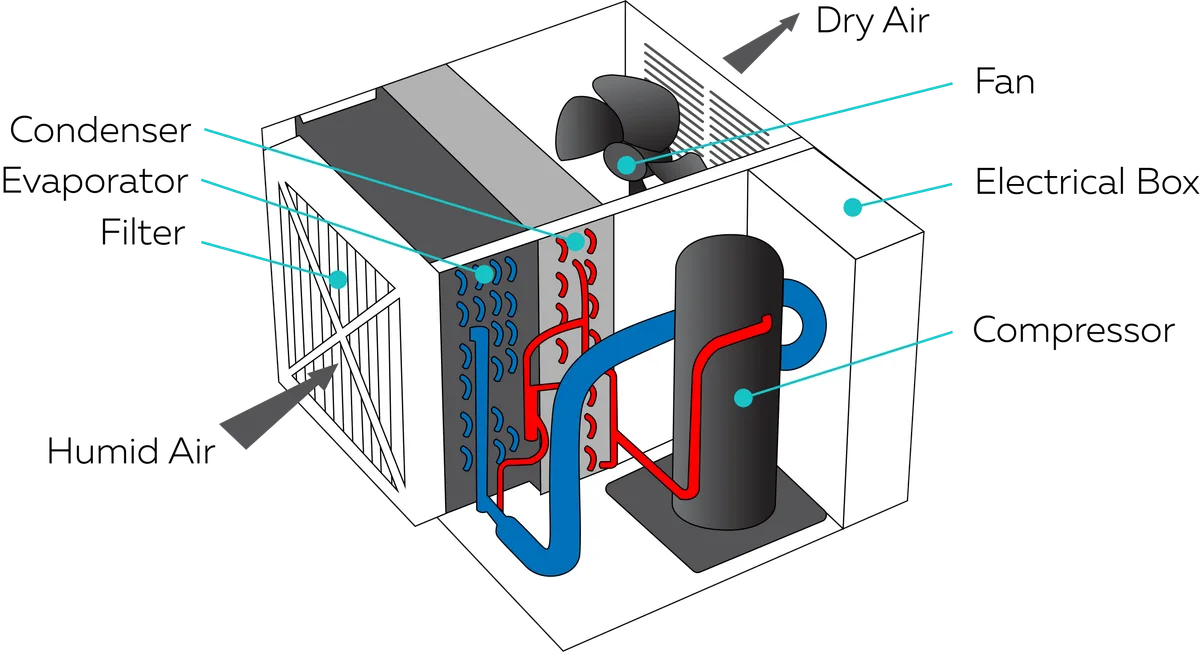
Image source: Bing (Web (fair-use with source credit))
When your dehumidifier starts making unusual noises, the first step is to figure out what you're hearing. Different noises point to different root causes. The more precisely you can describe the sound, the faster you'll find the fix.
Humming or buzzing. A low hum from the compressor is expected. But a louder-than-usual hum means the compressor might be working too hard. This often happens when the filter is dirty or the coils are iced up.
Rattling or vibrating. Loose panels, screws, or debris inside the unit cause most rattling. Check the water bucket too. If it isn't seated properly, it will rattle against the frame.
Squealing or screeching. This usually means the fan motor bearings are dry or worn. It can also mean a fan blade is hitting something inside the unit.
Clicking. A single click when the compressor kicks on or off is normal. Rapid or repeated clicking can mean a failing relay, a stuck float switch, or the unit cycling on and off too quickly.
Gurgling or bubbling. You might hear this while the unit is running or right after it shuts off. It's usually refrigerant moving through the system. Some gurgling is standard behavior, but loud or persistent bubbling can signal a refrigerant problem.
Dripping or splashing. Water sounds are normal from the condensate pump or drain line. If you hear splashing inside the unit, check the bucket for cracks or the pump for clogs.
The Main Noise Types and What They're Telling You

Image source: Web (Bing) / pangpond.com (Web image (fair-use with source credit))
Let's take a closer look at what each sound means for your appliance's health. Understanding the root cause helps you decide between a simple fix and a professional repair.
Compressor hum. The compressor is the heart of your dehumidifier. A consistent low hum is normal. If it gets louder or turns into a buzz, the compressor may be failing.
Loose mounting bolts can also cause excess vibration. Check those bolts first. If the hum continues and the unit is not pulling moisture, call a technician.
Fan noise. The fan moves air across the coils. A soft whir is normal. Squealing or scraping means the fan blade is hitting something or the motor bearings are worn.
Unplug the unit and inspect the blade for debris. Dust, a loose wire, or a cracked blade can cause scraping.
Refrigerant sounds. Gurgling or hissing can mean refrigerant is moving through the system. A little gurgling after shutdown is nothing to worry about. Persistent hissing or bubbling suggests a leak.
Refrigerant leaks require a certified technician to repair. The EPA regulates refrigerant handling for safety reasons.
Water noises. Splashing, dripping, or sloshing usually comes from the condensate pump or the water bucket. If the pump is running but not draining, the line might be clogged. If the bucket is full but the float switch is not triggering, water can back up and cause noise.
Clicking. One click when the compressor starts is normal. Repeated clicking means the unit is turning on and off rapidly. A dirty filter, frozen coils, or a failing control board can cause this.
Simple Fixes You Can Try Right Now
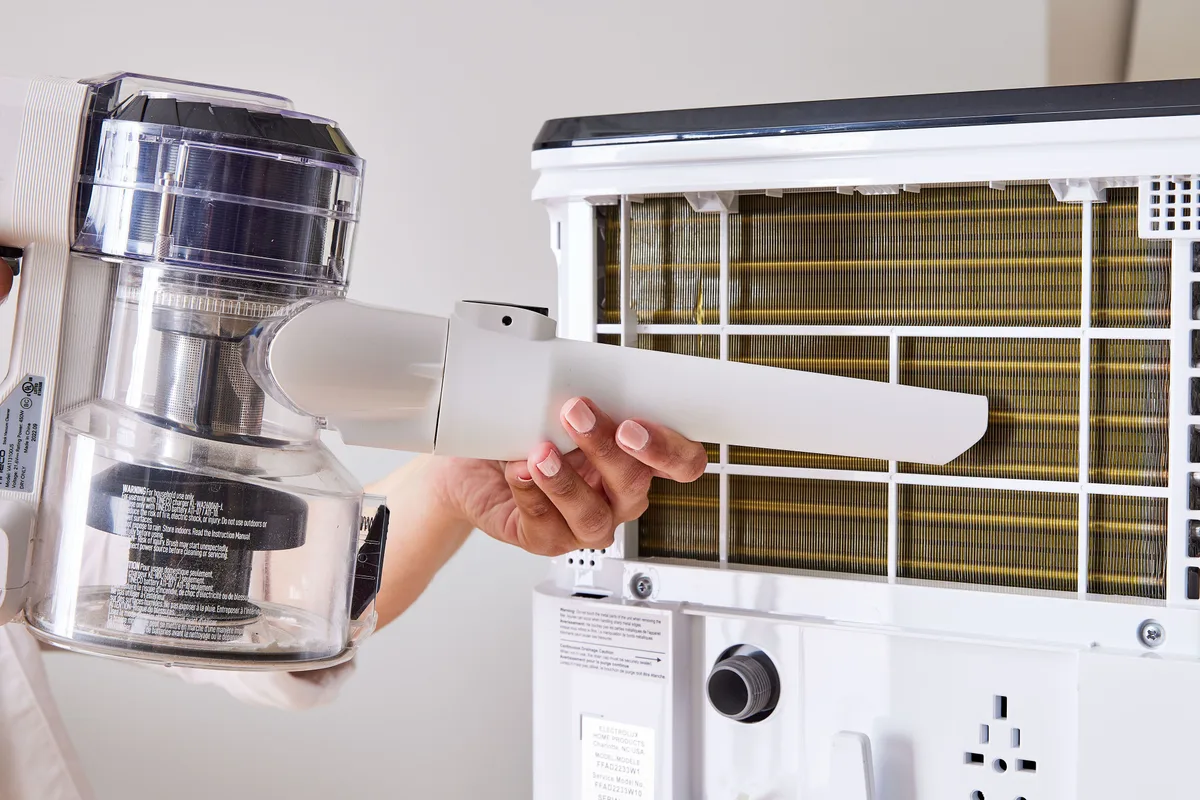
Image source: Bing (Web (fair-use with source credit))
Before you call a technician, there are several things you can check yourself. These fixes address the most common causes of dehumidifier noise.
Check and clean the air filter. A dirty filter restricts airflow. This forces the fan to work harder and can make the compressor cycle more often. Remove the filter and hold it up to light.
If you can't see through it, it needs cleaning. Wash it with warm water and mild soap. Let it dry completely before reinstalling.
Level the unit. If the dehumidifier isn't sitting level, it will vibrate and rattle. Use a bubble level to check. Adjust the feet or place a shim under the low corner.
A rubber mat underneath can absorb vibration, especially on hard floors.
Tighten loose panels and screws. Screws can work themselves loose over time. Check the outer casing, the control panel, and the water bucket. Tighten anything that feels loose.
If the bucket rattles, reseat it properly.
Check the drain line. If you're using continuous drainage, make sure the hose isn't kinked or clogged. A blocked drain makes the pump work harder. Confirm the hose slopes downward so water flows freely.
Inspect the fan blade. Turn off and unplug the unit. Remove the filter and look for the fan blade. Check for debris, dust buildup, or anything that might be hitting the blade.
Clean it gently with a soft brush.
Let the defrost cycle finish. If you hear gurgling or hissing and the coils look frosted, the unit is running a defrost cycle. That's just the defrost cycle doing its job. It should finish within 10 to 15 minutes.
If the coils stay frozen, the unit may need servicing.
When It's Time to Call a Pro (or Replace the Unit)
Some noises go beyond a simple DIY fix. Here's when you should call a professional or consider replacing the unit.
Compressor failure. If the compressor is humming loudly and the unit isn't dehumidifying, it may be failing. Compressor replacement is expensive. For portable units, it's often not worth the cost.
For a whole-house system, a technician can diagnose the exact issue.
Refrigerant leak. Hissing or bubbling that doesn't stop could mean a refrigerant leak. This requires a certified HVAC technician. Refrigerant handling is regulated by the EPA, so it's not a DIY job.
Motor failure. If the fan motor is squealing or has stopped working, it may need replacement. This is sometimes worth doing on higher-end units. On cheaper models, replacing the motor can cost nearly as much as a new dehumidifier.
Electrical issues. Rapid clicking or a unit that trips the breaker could mean a failing control board, relay, or capacitor. These components are best handled by an electrician or appliance technician.
Age of the unit. If your dehumidifier is more than 5 to 7 years old and making persistent noise, replacement is often the smarter move. Newer units are quieter and more energy-efficient. Our guide to the best dehumidifier can help you compare options.
Cost comparison. A simple repair might cost $50 to $150. A major repair can run $200 or more. A new portable dehumidifier costs between $150 and $400.
If the repair exceeds half the price of a new unit, replacement is usually the better choice.
Common Mistakes People Make When Troubleshooting
Even careful owners can go down the wrong path. Here are the most common mistakes to avoid.
Ignoring the filter. The most common cause of noise and inefficiency is a dirty filter. Many people never check it. A clogged filter makes the fan work harder and can cause the compressor to short cycle.
Clean or replace the filter every 3 to 6 months.
Not checking the unit's level. Vibration noise is often caused by an uneven floor. People assume the unit is level because it looks level. Always use a bubble level.
Even a slight tilt can cause rattling.
Overlooking the water bucket. A loose or cracked bucket can cause rattling and dripping. If the bucket isn't seated properly, the float switch may not work. This can lead to water backup and leaks.
Assuming all noises are bad. Some sounds are normal. A single click when the compressor starts is normal. A gentle gurgle after shutdown is normal.
The soft hum of the fan is expected. Knowing what's normal helps you spot what's not.
Forgetting to unplug the unit. Before inspecting the fan, filter, or internal parts, always unplug the dehumidifier. Electrical safety matters. Some people skip this step and risk injury.
Trying to repair refrigerant leaks yourself. Refrigerant handling is regulated by the EPA. DIY repair can vent refrigerant, which is both unsafe and illegal. Call a certified technician.
Buying a new unit too quickly. Many people replace a noisy dehumidifier without trying simple fixes. A $10 rubber mat and 15 minutes can solve a problem that feels like a $300 replacement. Try the easy stuff first.
Frequently Asked Questions
Why is my dehumidifier making a loud humming noise?
A loud hum usually means the compressor is straining. Check the air filter first. A clogged filter forces the compressor to work harder.
If the filter is clean, the unit may not be level. Try a rubber vibration pad. Persistent loud humming with no moisture removal means the compressor may be failing.
Is it normal for a dehumidifier to make clicking sounds?
A single click when the compressor starts or stops is normal. That's the relay engaging. Rapid or repeated clicking is not normal.
It usually means the unit is short cycling. A dirty filter, frozen coils, or an oversized unit can cause this. Check the filter and let the defrost cycle finish.
What causes a dehumidifier to rattle or vibrate?
Loose screws, panels, or an uneven floor cause most rattling. Check the outer casing and the water bucket. If the bucket isn't seated properly, it will rattle against the frame.
Place the unit on a solid, level surface. A rubber mat can reduce vibration on wood or tile floors.
Why does my dehumidifier sound like water is gurgling inside?
Gurgling is usually refrigerant moving through the coils. A little gurgling after the unit shuts off is normal. Loud or constant gurgling can indicate a problem.
Check the drain line for kinks or clogs. If the sound comes from the compressor area, you may need a technician.
How can I make my dehumidifier quieter?
Start with the basics. Clean the filter, level the unit, and tighten loose panels. Place the unit on a rubber mat to absorb vibration.
Run the fan at a lower speed if your model has that option. Keep the unit away from walls and furniture to allow proper airflow.
When should I replace my dehumidifier instead of repairing it?
If the unit is over 5 years old and needs a major repair, replace it. Compressor and refrigerant repairs often cost more than a new portable model. If the repair is less than half the price of a new unit, repairing is worth it.
Newer models are quieter and more efficient.
Quick Decision Guide: Fix It, Call a Pro, or Replace It?
Here's a simple decision tree to help you choose the right path.
| If you hear… | Likely cause | DIY fix? | Call a pro? | Replace? |
|---|---|---|---|---|
| Rattling or vibrating | Loose panels, uneven floor | Yes, tighten and level | No | No |
| Squealing or screeching | Fan motor or bearings | Check for debris | Yes, if bearings are worn | Only if unit is old |
| Loud humming, no moisture | Strained compressor | Check filter and level | Yes, if issue persists | Yes, if compressor is bad |
| Rapid clicking | Short cycling | Clean filter, defrost cycle | Yes, if control board issue | Yes, if unit is old |
| Hissing or bubbling | Refrigerant leak | No, not safe | Yes, certified technician | Yes, if leak is large |
| Gurgling water | Drain or pump issue | Clear the drain line | No, if drain clears | No |
Start with the free fixes. Clean the filter, level the unit, and tighten screws. These take about 10 minutes and solve most noise complaints.
If the noise persists, identify the sound type using the table above. Simple fixes cover rattling, mild gurgling, and most fan noise.
Call a professional for refrigerant issues, electrical problems, or compressor failure. Never attempt refrigerant repairs yourself.
Replace the unit if it's over 5 years old and the repair cost exceeds halfthe price of a new model. Newer units are quieter, more efficient, and often come with better warranties.
If you're considering a replacement, check our guide to the best dehumidifier for basement for quiet, high-capacity options. For broader choices, the best dehumidifier guide covers models for every room size and budget.