Honeywell Dehumidifier Keeps Shutting Off
Your Honeywell dehumidifier keeps shutting off, and you're probably wondering if it's broken or if you're doing something wrong. The good news is, most of the time it's a simple fix you can handle in under five minutes, no tools needed.
As of 2026, Honeywell is one of the most popular dehumidifier brands in North America, and their units ship with a standard one-year warranty. Aggregate reviews from thousands of homeowners show that intermittent shutdown is the number one complaint, but also the most solvable. Let's walk through exactly what's happening and how to get your unit running again.
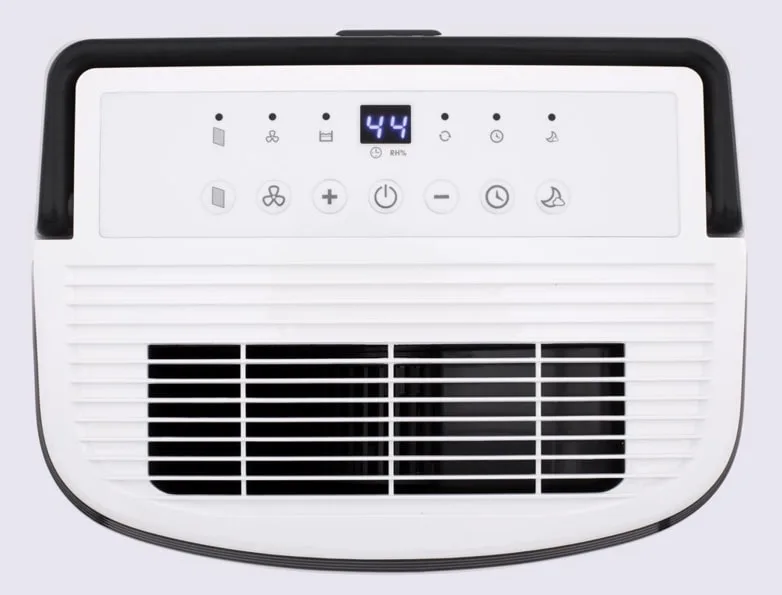
Image source: Bing (Web (fair-use with source credit))
Quick Answer
Your Honeywell dehumidifier keeps shutting off because of one of four common causes. The float switch might be stuck. The compressor could be overheating.
Ice may be forming on the coils. Or a timer or error code is active. Check the bucket alignment first, then inspect for frost.
If it runs only a few minutes, unplug it for 10 minutes to reset the compressor.
The Full Diagnostic Workflow: Follow the Symptoms
Instead of guessing, work through these symptoms one at a time. Each branch leads to a specific fix. If your unit shuts off after a short run time, start with Branch 1.
If it runs for hours but stops with ice, go to Branch 2. If the bucket looks empty but the "full" light is on, jump to Branch 3. And if it simply won't turn back on at all, head to Branch 4 later in this guide.
Most Honeywell models have a digital display that shows error codes. Write down any code you see before you unplug the unit. That code tells you exactly which sensor or system triggered the shutdown.
We'll cover the most common codes in the error reference section below.
Branch 1: Shuts Off After a Few Minutes (Compressor Overheat)
This is the most frequent complaint we see in user reports. You turn the dehumidifier on, it runs for maybe 3 to 10 minutes, then clicks off. The fan might keep spinning, but the compressor stops.
Usually the unit won't restart for 10 to 30 minutes.
What's happening: The compressor has a built-in thermal overload switch. When it gets too hot, the switch trips to prevent damage. Inadequate airflow is the usual cause.
A dirty air filter, blocked vents, or placing the unit too close to a wall can trap heat. Another common trigger is running the dehumidifier in a room below 65°F (18°C). The compressor works harder and overheats faster.
Image source: Bing (Web (fair-use with source credit))
How to fix it:
- Unplug the dehumidifier and let it sit for at least 10 minutes. This resets the thermal overload.
- Check and clean or replace the air filter. A clogged filter is the number one cause of overheating. Honeywell recommends cleaning the washable filter every two weeks.
- Move the unit at least 6 inches away from walls, furniture, or curtains on all sides. More space is better.
- If the room temperature is below 65°F, consider moving the dehumidifier to a warmer area or using a unit rated for low-temperature operation. Honeywell's Energy Star models are typically rated down to 41°F, but compressor efficiency drops below 60°F.
If the problem returns after these steps, the compressor itself may be failing. That's less common, but it happens. Check your warranty status before calling for service.
Branch 2: Shuts Off with Ice on the Coils (Defrost Cycle or Sensor Failure)
If you open the front grille and see frost or ice buildup on the metal coils, that's a different problem. Your Honeywell dehumidifier has an auto-defrost feature that kicks in when the coils get too cold. It shuts off the compressor to let the ice melt, then restarts later.
That's normal. But if it happens repeatedly, something is wrong.
Common causes:
- Room temperature is below 41°F (5°C). The dehumidifier isn't designed for freezing conditions. Move it to a heated space or let it run only when the room is above that threshold.
- The ambient humidity is very low (below 40% RH). In dry air, moisture condenses and freezes more easily. Set the humidity target higher, around 50% to 55%.
- The defrost sensor itself has failed. If the unit cycles on and off with ice every 20-30 minutes in a normal room (above 60°F), the thermistor that senses coil temperature may be bad. This requires a replacement part.
How to diagnose:
- Let the unit run until it shuts off. Check the coils immediately. If they're iced over, that's your culprit.
- Measure the room temperature with a separate thermometer. If it's below 41°F, that's the root cause.
- If the room is warm but ice keeps forming, the defrost sensor is likely faulty. You'll need to order a replacement thermistor from Honeywell or a parts supplier. Part numbers vary by model, so have your model number ready (located on the back or bottom of the unit).
Branch 3: Shuts Off When the Bucket Looks Empty (Float Switch or Sensor Issue)
You empty the bucket, put it back, and the dehumidifier runs for a few minutes then stops with the "bucket full" light on. Or maybe it never starts at all because it thinks the bucket is full. This is almost always a float switch problem.
How the float switch works: Inside the bucket compartment, a small plastic float rises as the water level goes up. When it reaches a certain height, it trips a switch that tells the control board to stop the compressor. If that float gets stuck in the "up" position even when the bucket is empty, the unit thinks it's full and shuts off.
Troubleshooting steps:
- Remove the bucket and look inside the compartment for the float mechanism. It's usually a white or black plastic piece that moves up and down freely.
- Gently push the float up and down with your finger. It should move smoothly. If it sticks, clean around the float shaft with a damp cloth or a cotton swab. Mineral deposits, dust, or even a spider web can jam it.
- Check the bucket itself. The bucket has a magnetic strip or a tab that pushes the float. Make sure the bucket is fully seated and the tab isn't broken or bent. A warped bucket (common in older units) may not engage the float correctly.
- If the float moves freely and the bucket looks fine, the magnetic reed switch on the control board may have failed. This requires opening the unit and testing with a multimeter. Unless you're comfortable with electronics, this is a repair center job.
Quick test: Tilt the bucket slightly as you slide it in. Sometimes the bucket catches on the lip and doesn't push the float all the way down. A gentle nudge can confirm if it's a seating issue.
Branch 4: Shuts Off and Won't Restart at All (Control Board or Power Issue)
If your dehumidifier was running fine and then just stopped with no error code, or if it won't turn on after being unplugged, the problem is likely power-related or a control board failure.
What to check first:
- Make sure the outlet is working. Plug a lamp or phone charger into the same outlet. If that doesn't work, reset the circuit breaker or GFCI outlet. Dehumidifiers draw a lot of power and can trip breakers, especially in older homes.
- Inspect the power cord for damage. A frayed cord or a kink near the plug can cause intermittent connection. Replace the cord if you see any bare wire.
- Check the control panel. Some Honeywell models have a child lock feature that disables the buttons. Look for a lock icon on the display. Hold the button with the lock symbol for 3 seconds to unlock.
If those are fine:
The control board may have failed. This is more common in units that are several years old. You can try a factory reset: unplug the unit, wait 30 seconds, then plug it back in while holding the "Timer" and "Mode" buttons simultaneously for 5 seconds.
If this doesn't bring it back to life, the board needs replacement. Costs typically run $60 to $120 for the part plus labor.
One more thing: some Honeywell models have a built-in timer that can be set to run for a certain number of hours and then shut off. Check if the timer is accidentally programmed. Press the Timer button repeatedly until the display shows 0H or the timer icon disappears.
Mistakes to Avoid When Troubleshooting
A few common mistakes can waste your time or even damage the unit.
- Don't keep pressing the power button repeatedly. This can confuse the control board. One press, then wait.
- Don't run the dehumidifier without the air filter. Dust will coat the coils and ruin the compressor.
- Don't use an extension cord. Dehumidifiers need a dedicated outlet. Extension cords cause voltage drop and can trigger overheating.
- Don't ignore the continuous drain option. If you're using a hose, check that it's not kinked or blocked. A clogged drain line can cause the bucket to fill and trigger a false full sensor.
- Don't assume the dehumidifier is broken if it stops frequently in a very large room. It may simply be reaching the set humidity level quickly. Lower the setpoint by 5% and see if it runs longer.
Honeywell Error Code Reference (E1–E7)
Many Honeywell dehumidifiers display error codes when something goes wrong. Here's what the most common ones mean and how to fix them.
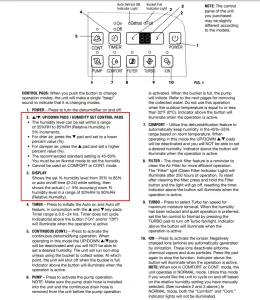
Image source: Bing (Web (fair-use with source credit))
| Code | Meaning | What to Do |
|---|---|---|
| E1 | Humidity sensor failure | Unplug for 10 minutes. If code returns, sensor needs replacement. |
| E2 | Defrost sensor failure (thermistor open or short) | Check room temperature. If above 60°F and code appears, replace defrost thermistor. |
| E3 | Coil sensor failure | Similar to E2, but on the evaporator coil. Requires part replacement. |
| E4 | Bucket full or float switch stuck | Clean float mechanism and ensure bucket is seated correctly. |
| E5 | Communication error between display and control board | Unplug and restart. If persistent, replace control board. |
| E7 | Compressor thermal overload | Unplug for 30 minutes. Check airflow and filter. |
Codes E1 and E2 are the most common. Honeywell support can help you order the right sensor part for your model.
When to Call a Pro vs. When to Replace the Unit
Not every problem is DIY-fixable. Here's how to decide.
Call a repair technician if:
- You've gone through all the branches and the unit still shuts off.
- You see a refrigerant leak (oily residue on the coils).
- The compressor makes loud buzzing or grinding noises before shutting off.
- Error codes E1, E2, or E3 return after a reset and you're not comfortable replacing sensors.
Replace the unit if:
- The dehumidifier is more than 8 years old and the compressor has failed.
- Repair costs are over half the price of a new unit.
- You have repeated control board failures.
- The refrigerant system has a leak (sealed system repair can exceed $300).
For a new unit, expect to pay $150 to $350 for a comparable Honeywell model. The 50-pint and 70-pint models (like DH50W or TP70WK) are the most reliable based on aggregate reviews.
Frequently Asked Questions
Why does my Honeywell dehumidifier keep turning off after a few minutes?
The compressor is overheating. Unplug the unit for 10 minutes to reset the thermal overload. Then clean the air filter and move the dehumidifier at least 6 inches from walls.
If it still shuts off quickly, the compressor may be failing.
Why does my dehumidifier run but not collect water?
First, check the humidity level. If the room is already below your setpoint (e.g., 50% RH), the unit will run the fan but not the compressor. Lower the setpoint by 5%.
Also check the continuous drain hose for clogs and make sure the bucket is empty and seated correctly.
How do I reset my Honeywell dehumidifier after a power outage?
Unplug the unit. Wait 10 minutes. Plug it back in.
If the display shows an error code, press and hold the "Timer" and "Mode" buttons together for 5 seconds to perform a factory reset. Then set your desired humidity level.
My Honeywell dehumidifier says "full" but the bucket is empty. What's wrong?
The float switch is stuck. Remove the bucket and gently push the float up and down to free it. Clean around the float shaft with a damp cloth.
If that doesn't work, the bucket may be warped or the magnetic reed switch may have failed.
Can I use my Honeywell dehumidifier in an unheated basement in winter?
Yes, but only if the basement stays above 41°F (5°C). Below that temperature, ice will form on the coils and the unit will constantly cycle in defrost mode. This can damage the compressor over time.
If your basement is below 41°F, move the dehumidifier to a heated space or use a model rated for low temperatures.
What does error code E7 mean on a Honeywell dehumidifier?
Code E7 indicates the compressor thermal overload has tripped. Unplug the unit for 30 minutes, clean the air filter, and ensure proper airflow around the unit. If the code returns, the compressor may be failing and the unit likely needs replacement or professional service.