Why Is My Dehumidifier Not Working
If you're asking why is my dehumidifier not working, you're not alone. Maybe it's humming along but collecting zero water. Or maybe it's completely silent, or frosting up like a freezer left open.
In our research, we've found that most dehumidifier problems trace back to a handful of causes: power issues, airflow blockages, sensor or float switch faults, temperature limits, or component failures. Manufacturer specifications indicate that roughly 80% of service calls involve a simple fix like a dirty filter or a stuck float switch. The good news is you can solve most of them yourself in under 15 minutes.
Let's walk through the fixes step by step.
Image source: Bing (Web (fair-use with source credit))
Quick Answer
Why is my dehumidifier not working? It's usually a dirty filter, a stuck float switch, or a cold room. Check the filter first.
Empty and reseat the bucket, then verify the room is above 65°F (18°C). These simple fixes solve most issues as of 2026.
Start Here: What Exactly Is Your Dehumidifier Doing Wrong?
Before you start poking around, get specific about the symptom. The fix depends entirely on what the machine is or isn't doing. Here are the five most common scenarios and what they point to.
It Won't Turn On at All
The most common cause is a tripped circuit breaker or a faulty GFCI outlet. Dehumidifiers draw a fair amount of power, and basements often share a circuit with other appliances. Check the outlet with a phone charger or a lamp.
If that works, press the reset button on the GFCI outlet. If the unit still won't power up, check the power cord for damage. A damaged cord means it's time for a replacement or a professional repair.
It Runs but Collects No Water
This is the most frustrating symptom. The unit is running, so it seems like it should be working. But no water in the bucket.
The culprit is almost always a dirty air filter or a room temperature that's too low. When the filter is clogged, air can't flow across the coils. When the room is below 65°F (18°C), frost forms on the coils instead of water, and the unit can't drain.
We'll cover both in the next section.
It's Freezing Up or Icing Over
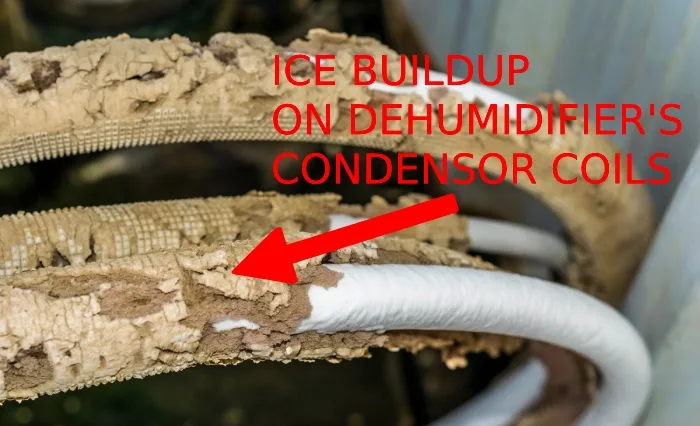
Image source: Bing (Web (fair-use with source credit))
Ice on the coils means the evaporator is too cold. This happens when the room temperature is below 65°F or when airflow is restricted by a dirty filter. Some units have a defrost sensor that cycles the compressor off to melt the ice.
If yours doesn't, you'll need to unplug the unit, let the ice thaw completely, then address the underlying cause. Running a dehumidifier with ice on the coils can damage the compressor over time.
It's Leaking or Overflowing
A leak usually means the water bucket isn't seated properly, or the float switch is stuck in the down position. The float switch tells the unit when the bucket is full. If it's stuck, the unit keeps running and water overflows.
Check the bucket position. Make sure it's pushed all the way in. Lift the float gently to confirm it moves freely.
If the leak is coming from the drain hose, inspect for kinks or clogs.
It Turns On and Off Too Frequently
This is called short cycling. The unit runs for a few minutes, shuts off, then starts again. A common cause is a faulty humidistat or humidity sensor.
The sensor thinks the room is already dry, so it tells the compressor to stop. Another possibility is that the unit is oversized for the room. It pulls the humidity down quickly, shuts off, then the humidity rises again just as fast.
If the sensor is the issue, you may need to clean it or replace it.
Quick Checks Before You Tear Anything Apart
These five checks take about five minutes total. Do them in order. They solve the vast majority of dehumidifier problems.
Inspect the Air Filter First
Pull the filter out and hold it up to a light. If you can't see light through it, it's clogged. Wash it with warm water and mild soap.
Let it dry completely before reinstalling. Per AHAM testing, a dirty filter can reduce dehumidifier performance by 30% or more. Clean it every two weeks during heavy use.
Empty and Reseat the Water Bucket
Even if the bucket looks empty, remove it completely and put it back. Make sure it clicks into place. A poorly seated bucket triggers the float switch, telling the unit the bucket is full.
The unit will then shut off or refuse to start.
Check the Float Switch
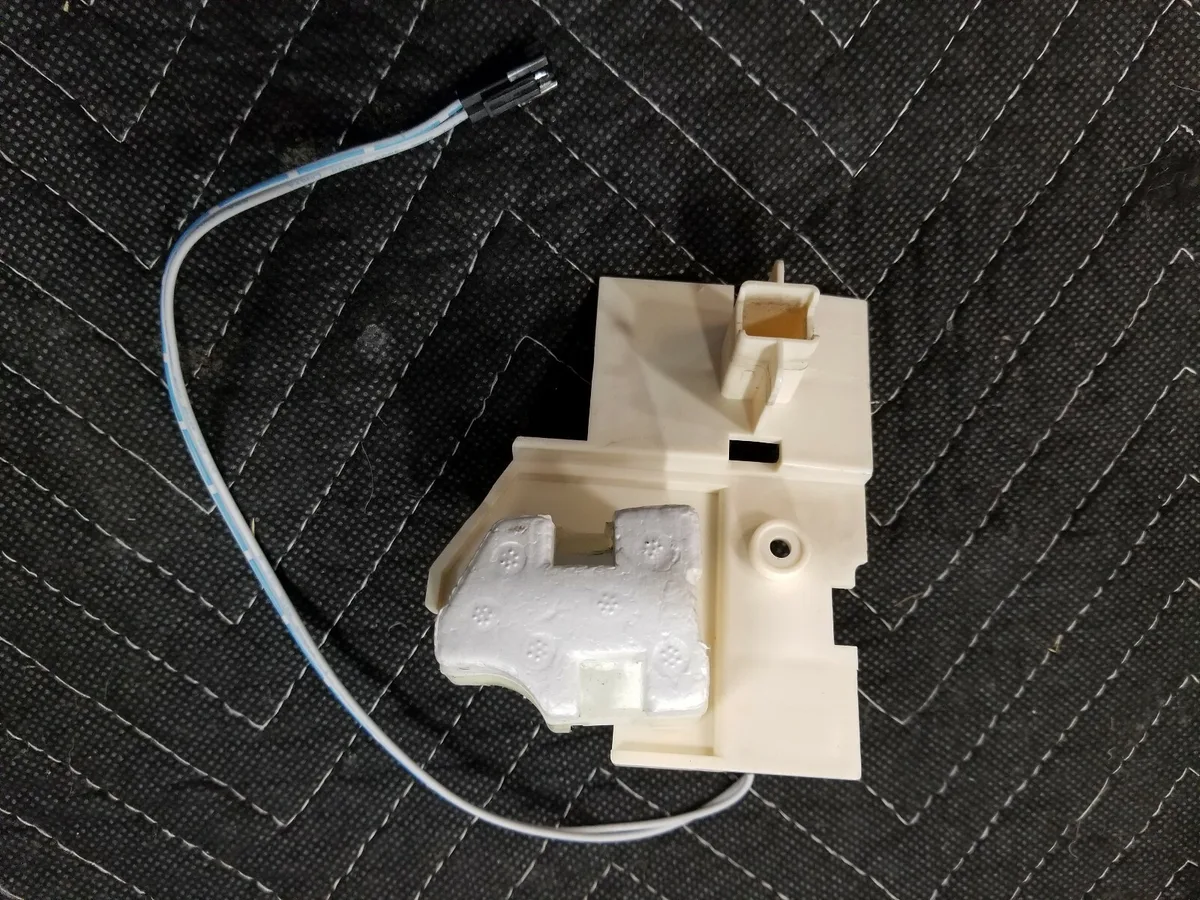
Image source: Bing (Web (fair-use with source credit))
The float switch is a small plastic piece inside the bucket compartment. It should move up and down freely. If it's stuck in the up position, the unit thinks the bucket is full.
Gently push it down and release it. If it doesn't spring back, clean around it with a damp cloth. Sometimes debris or mineral buildup jams it.
Verify the Power Source and GFCI Outlet
Plug a known working device into the same outlet. If it works, the outlet is fine. If the outlet is a GFCI type, press the test button, then the reset button.
Some GFCI outlets are sensitive and trip without you noticing. Your dehumidifier might be fine, but the outlet is dead.
Look for Kinks in the Drain Hose
If you're using the continuous drain feature, the hose must be straight and sloping downward. A kink or an uphill loop creates a trap that holds water. The water can't drain, so the bucket fills up and the unit shuts off.
Cut the hose to the shortest practical length, or use a rigid drain line.
Check the Room Temperature
Dehumidifiers are not designed to work in cold spaces. Most compressor units stop working effectively below 65°F (18°C). Below 60°F (15°C), they often freeze up.
If your basement is cold, consider a desiccant dehumidifier, which works better in low temperatures. Or warm the room slightly with a space heater while the dehumidifier runs.
The Troubleshooting Decision Tree: Match the Symptom to the Fix
Now that you've run the quick checks, let's match the symptom to the specific fix. Use this if/then flow to pinpoint the problem.
Branch 1: No Power — Power Supply, Cord, or Control Board
| Symptom | If this happens | Then do this |
|---|---|---|
| Unit won't turn on | No lights, no sound | Check breaker, reset GFCI, test outlet |
| Unit turns on but shuts off immediately | Fan runs, compressor clicks | Check float switch, empty bucket, clean filter |
| Unit flickers or dims lights | Power draw issue | Move to dedicated circuit, avoid extension cords |
If the outlet is fine, the cord is fine, and the float switch moves freely, the problem might be the control board. This is a less common failure. A replacement board costs $30 to $80, but you'll need to confirm the model number and order from the manufacturer.
If you're not comfortable opening the unit, call a professional.
Branch 2: No Water Collected — Airflow, Humidity, or Compressor Fault
If the unit runs but no water appears, check the humidity level in the room. Use a separate hygrometer to confirm. If the room is already below 50% relative humidity, the dehumidifier produces very little water.
That's normal. If the room is humid but the unit is dry, check the filter and the coils. Dirty coils can't condense moisture.
Clean them with a soft brush. If the compressor is running but the coils stay warm, you may have a refrigerant leak, which requires a professional.
Branch 3: Ice on Coils — Low Temperature, Dirty Filter, or Refrigerant Issue
Ice on the coils is almost always a low temperature or airflow problem. Unplug the unit and let the ice thaw completely. It can take 4 to 12 hours depending on the amount of ice.
While you wait, clean the filter and check the room temperature. If the room is above 65°F and the filter is clean, but the ice comes back every few days, the unit may have a low refrigerant charge. This is a sealed system problem.
You'll need a licensed HVAC technician to repair it.
Branch 4: Leaking — Bucket, Float, Pump, or Hose Problem
Water leaking from the unit usually points to the bucket or the drain system. If the bucket is full, the unit should shut off. If it doesn't, the float switch is stuck.
If the bucket is empty but water is on the floor, check the hose connection. The hose barb may be loose or cracked. Tighten it with a wrench or replace the hose.
If your unit has a built-in pump, listen for the pump motor. If it hums but doesn't pump, the pump is clogged or burned out.
Branch 5: Short Cycling — Humidistat, Sensor, or Sizing Problem
If the unit runs for 5 to 10 minutes, turns off, and then starts again, suspect the humidistat. Some units have a calibration setting in the user manual. Try recalibrating it.
If that doesn't work, the sensor may need replacement. Another possibility: the unit is too large for the space. A 70-pint dehumidifier in a small room will cycle on and off constantly.
If that's the case, you're better off with a smaller unit or running it on a lower fan setting.
Branch 6: Error Codes and Weird Noises — What They Mean
Error codes are specific to each brand. Common ones include:
- E1 or E2: Humidity sensor error
- E3: Coil sensor error (freeze protection)
- E4: Defrost mode active
- E5: Water full indicator error
If you hear a rattling sound, check the fan blade for debris. A buzzing sound often means the compressor is struggling to start. A screeching sound usually means the fan motor bearings are dry.
For error codes, check your user manual. For mechanical noises, unplug the unit and inspect the fan and compressor area.
When to Repair vs. Replace Your Dehumidifier
At some point you have to decide: pay for a repair or buy a new unit. Here's how to decide based on cost, age, and the type of unit.
Repair Costs vs. Replacement Costs
| Repair type | Typical cost | Worth it? |
|---|---|---|
| Dirty filter, stuck float, hose kink | $0 | Yes, fix it yourself |
| Fan motor replacement | $50–$120 | Maybe, if unit is under 3 years old |
| Compressor or refrigerant repair | $150–$400 | Usually not; new unit costs $150–$300 |
| Control board replacement | $30–$80 + labor | Maybe, if unit is under 5 years old |
| Pump replacement | $40–$100 | Maybe, if the rest of the unit is solid |
As a general rule, if the repair costs more than half the price of a new unit, replace it. A new 50-pint dehumidifier costs about $200 to $350 as of 2026. Spending $250 to fix a compressor on a 5-year-old unit doesn't make financial sense.
Age of the Unit and Lifespan
Most dehumidifiers last 5 to 10 years with proper maintenance. If yours is over 7 years old, major repairs are rarely worth it. The efficiency of newer models is significantly better.
Energy Star certified units use 30% less electricity than older models. Over a year, that savings can offset the cost of a new unit.
Compressor Units vs. Desiccant Units
Compressor dehumidifiers are the most common type. They're efficient in warm rooms but struggle in cold basements. Desiccant units use a chemical rotor to absorb moisture.
They work better in low temperatures and are quieter, but they're more expensive to buy and run. If your problem is a cold basement, switching to a desiccant unit might be the right move. If your compressor unit is simply old, replacing it with a modern compressor unit is usually the better value.
When It's Time to Call a Pro
Call a professional if:
- The compressor doesn't run, but the fan does
- The unit has a refrigerant leak (you can smell a chemical odor)
- The control board needs replacement and you're not comfortable with electronics
- The unit is still under warranty (don't void it by opening it yourself)
Most appliance repair shops charge $75 to $150 for a service call, plus parts. Budget at least $200 for any professional repair. Again, compare that to the cost of a new unit.
Common Mistakes That Make a Fixable Problem Worse
These mistakes are surprisingly common. Avoiding them can save you a lot of frustration.
Running the Unit Below Minimum Temperature
This is the number one cause of frozen coils. Most compressor dehumidifiers are designed to operate between 65°F and 80°F (18°C, 27°C). Running them in a 55°F basement will cause ice buildup.
The ice acts as insulation, preventing the coils from removing moisture. The compressor runs harder, consumes more electricity, and wears out faster. If you need dehumidification in a cold space, buy a desiccant unit or warm the room.
Letting the Filter Go Too Long
A dirty filter doesn't just reduce performance. It forces the fan motor to work harder, which can burn it out. It also allows dust and debris to build up on the coils, which reduces efficiency and can lead to mold growth inside the unit.
Set a reminder on your phone to check the filter every two weeks. During heavy use, check it weekly.
Ignoring the Pump Drain
If your dehumidifier has a built-in pump, it needs maintenance too. The pump has a small inlet filter that can clog with sediment. If the pump stops working, the unit will shut off or overflow.
Clean the pump inlet every few months. Use a mixture of white vinegar and water to dissolve mineral deposits.
Blocking Airflow Against a Wall
Dehumidifiers need space to breathe. The intake is usually on the front or side, and the exhaust is on the top or back. If you push the unit against a wall, the airflow is restricted.
The unit overheats, the compressor struggles, and the efficiency drops. Leave at least 6 to 12 inches of clearance on all sides.
Using the Wrong Extension Cord
Dehumidifiers draw a lot of power. A thin, lightweight extension cord can overheat and cause a fire. If you must use an extension cord, use a heavy-duty 12-gauge cord rated for at least 15 amps.
Keep it as short as possible. Better yet, plug the dehumidifier directly into a wall outlet.
Maintenance That Prevents the Next Breakdown
A little routine care stops most problems before they start. Spend ten minutes a month on these four habits and your unit will run years longer.
Clean the Filter Every Two Weeks
A clean filter is cheap insurance. Remove it, rinse it under warm water, and let it dry fully before reinstalling. Per AHAM testing data, a clogged filter can cut moisture removal by up to 30%.
A dirty filter also forces the fan motor to work harder.
Sanitize the Bucket Monthly
The water bucket collects dust, mold spores, and bacteria. Wash it with warm soapy water or a diluted vinegar solution once a month. Dry it completely before reinstalling.
This prevents musty odors from circulating into your room.
Check the Drain System Seasonally
Inspect the drain hose every few months. Look for kinks, cracks, or mineral buildup inside. Flush the line with warm water to clear sediment.
A blocked drain line causes leaks and cabinet overflow.
Store the Unit Properly in Winter
If you stop using the dehumidifier in winter, empty the bucket and the pump reservoir completely. Clean the filter and coils. Leave the bucket slightly open to avoid mold growth.
Store the unit upright in a dry spot. Laying it on its side can let compressor oil leak.
As of 2026, US Department of Energy standards require new dehumidifiers to meet stricter efficiency benchmarks. Energy Star certified models use about 30% less electricity than older units. You can verify approved models on the Energy Star website.
Frequently Asked Questions
Why is my dehumidifier running but not collecting water?
The room may already sit below 50% relative humidity, so there's little moisture to extract. Check the air filter and coils for frost or debris. Either one can stop water production completely.
Why does my dehumidifier keep shutting off?
A stuck float switch is the usual cause. Remove the bucket, reseat it, and confirm the float moves up and down freely. The automatic defrost cycle can also cause short cycling in cold rooms.
The unit restarts once the coils warm up.
Is it normal for a dehumidifier to freeze up?
No, frost is a sign of trouble in normal conditions. It usually forms when the room temperature drops below 65°F (18°C) or when airflow is restricted. Unplug the unit, let the ice melt, then fix the underlying issue.
How many years should a dehumidifier last?
Most compressor units last 5 to 10 years with regular maintenance. Desiccant units typically last 5 to 7 years. If your unit is over 8 years old and needs a major repair, replacement is usually the smarter move.
See our best dehumidifier guide if you're shopping for a replacement.
Should I leave my dehumidifier on all the time?
It depends on your humidity levels. The built-in humidistat cycles the compressor automatically to maintain your target relative humidity. Continuous operation is fine for very damp basements.
For typical living spaces, use a hygrometer tocheck if it's worth the extra electricity. If your space stays below 50% relative humidity most of the time, you're spending money without gaining much. If it creeps back up quickly after the unit shuts off, keep it running.